Build Your Own SERP Rank Tracker Using Python and a SERP API
Your rankings change every day, sometimes multiple times a day. Checking them manually doesn’t scale past a handful of keywords, and most off-the-shelf tools either show you yesterday's data or charge extra to refresh it more often.
If you want full control over your data, reporting, and automation, you need to build your own rank tracker with an API.
This guide shows you how to build the best rank tracker with API access using Python and a SERP API. You’ll create a lightweight system that handles SERP monitoring, stores historical rankings, supports daily rank tracking, and scales to thousands of keywords without relying on a third-party dashboard.
By the end, you'll have a tracker that runs automatically on your schedule, sends alerts when rankings drop, stores your own history, and feeds straight into your own dashboards.
What Does a Rank Tracker Actually Do?
A rank tracker automatically queries search results, extracts ranking positions, stores them over time, and compares changes between checks. Unlike a one-time SERP lookup, it generates historical visibility data to support trend analysis, alerts, reporting, and large-scale keyword monitoring across locations and devices.
At its core, a rank tracker follows a simple workflow:
Query: It sends a keyword (plus device, location, and search engine settings) to the API.
Fetch: Returns the SERP as structured JSON, including organic results, positions, URLs, and any SERP features present as shown below:
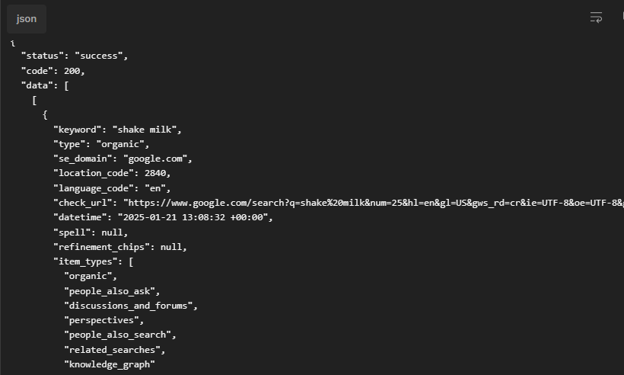
(Bishopi SERP API response)
See the API documentation for the full response structure here.
Store: Saves the result with a timestamp so you can track movement over time.
That third step is what separates a tracker from a checker. A SERP checker answers "where do I rank right now?" A SERP monitoring tool answers "where do I rank right now, and how has that changed since last week?"
The data pipeline is identical, but the difference is whether you're storing and comparing results, or just printing them once and throwing them away.
You can also vary the query parameters: desktop vs. mobile, different geographic locations, and search engines. Each of those is just another dimension in your stored data, which is why the schema design in Step 3 matters more than it looks.
Why Build Your Own Rank Tracker?
Building a rank tracker with a SERP API gives you full control over data collection, storage, reporting, and update frequency. While SaaS platforms provide convenience, custom systems offer flexibility, lower costs at scale, complete data ownership, and easier integration into existing applications.
Let’s see the difference between building your own SERP rank tracker with an API vs using a SaaS tool.
Build with API | SaaS Tool | |
Cost | Pay per query. Roughly $0.6 per 1,000 queries at volume | Mid-tier suites- $100-$300/month flat, regardless of how much you actually use, especially for platforms like Semrush and Ahrefs |
Flexibility | Any keyword set, any frequency, any location. You change it in code and deploy right away | Limited to the platform's feature set, keyword caps, and refresh rate limits |
Data ownership | Your schema, your database, your exports. Query it however you want | Locked into the platform; exporting is manual, gated, or both |
Setup time | 1–2 hours to your first working query and stored result | Minutes to a dashboard, but hours to customize reporting to match your workflow |
Maintenance | You own the code. You handle API changes, schema migrations, and scheduling | The vendor maintains the platform; you just log in |
What Do You Need to Build a SERP Tracker?
Before you write any code, you need these four things:
A Bishopi SERP API key
Python 3.8+ (the requests library is the only dependency for the core build)
A place to store results — a CSV file is fine to start; you’ll use SQLite or PostgreSQL once you're tracking at scale
A list of keywords you want to track, plus your target domain
That's it. No SDK installs, no config files. Just an API key and a Python interpreter.
How to Build a Rank Tracker With API Access in 4 Steps
Follow these simple steps to build a system for SERPs tracking.
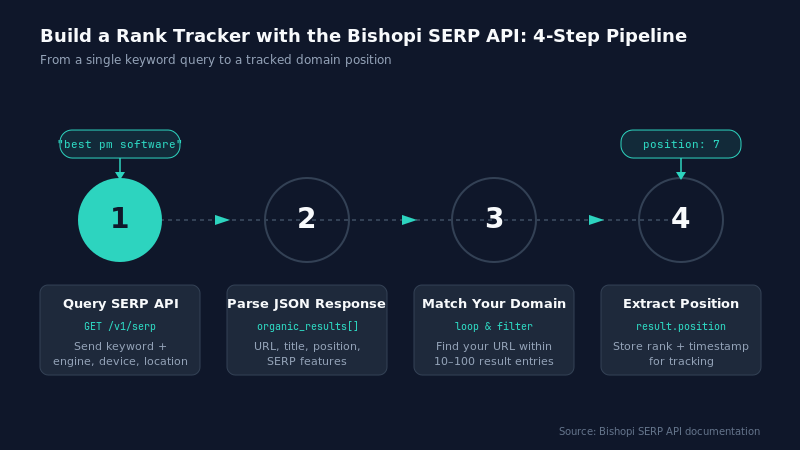
Step 1: Query the SERP API for a Keyword
Start by sending a single keyword to the Bishopi SERP API. The response comes back as JSON containing the organic results, each with a URL, title, and position, plus any SERP features present on the page.
Here's the minimal request example:
import requests
API_KEY = "your_bishopi_api_key"
BASE_URL = "https://api.bishopi.io/v1/serp"

params = {
    "api_key": API_KEY,
    "keyword": "best project management software",
    "engine": "google",
    "device": "desktop",
    "location": "United States"
}
response = requests.get(BASE_URL, params=params)
data = response.json()
print(data["organic_results"][:3])  # peek at the top 3 results
That single call gives you everything downstream steps need: the ranked URLs, their positions, and the raw SERP feature data you'll come back to in the "Beyond Position" section.
Step 2: Extract the Position for Your Domain
Once you have the SERP response, find your domain.
Most APIs return an organic_results array containing ranking entries.
A raw list of 10–100 results isn't useful on its own. You want to know where your domain sits. Loop through organic_results, match the domain, and return its position. If your domain doesn't appear, return "not ranked" rather than letting the script error out.
def get_position(results, target_domain):
    for result in results:
        if target_domain in result["url"]:
            return result["position"]
    return "not ranked"

position = get_position(data["organic_results"], "yourdomain.com")
print(f"Current position: {position}")
This simple parser becomes the foundation of your Google SERP analysis workflow.
You can expand it later to track multiple URLs, competitors, or branded queries.
The goal is to find your URL, extract your domain’s position, and then store the results.
Step 3: Store the Result with a Timestamp
Without a timestamp, your tracker is just a one-time lookup tool. Equally, without storage, you’re just running a SERP checker.
Store each result with a date, the keyword, the position, the URL that ranked, and the device/location combo you queried. A CSV is enough for getting started:
import csv
from datetime import datetime
with open("rankings.csv", "a", newline="") as file:
    writer = csv.writer(file)
    writer.writerow([
        "best rank tracker with api",
        datetime.utcnow(),
        position,
        target_domain,
        "desktop",
        "United States"
    ])
As your daily rank tracking grows, move this data into SQLite or PostgreSQL with this schema:
keyword | date | position | url | device | location
That makes reporting and alerting much easier.
Step 4: Schedule The Tracker
A rank tracker only becomes useful when it runs automatically.
Most daily rank tracking setups run once per day, since SERPs don't typically shift meaningfully hour-to-hour for most keywords. You have three solid options:
cron (Linux/Mac): Add a line to your crontab to run the script daily
Windows task scheduler: Equivalent functionality on Windows
GitHub actions: The modern developer default; a scheduled workflow runs your script on GitHub's infrastructure - free runners, no server required.
A minimal GitHub actions workflow looks like this:
name: rank-tracker
on:
schedule:
- cron: "0 6 * * *" # runs daily at 6 AM UTC
jobs:
track-rankings:
runs-on: ubuntu-latest
steps:
- uses: actions/checkout@v4
- run: pip install requests
- run: python tracker.py
JavaScript note: The same four-step pattern works with fetch or axios instead of requests. The API call, JSON parsing, and storage logic translate directly if Node is more your stack.
How Do You Handle Rate Limits and Errors?
A reliable rank tracker should automatically handle API rate limits, timeouts, and server errors. The standard approach is to retry failed requests with delays, log unsuccessful queries, and continue processing remaining keywords so a single failure does not interrupt the entire tracking run.
At a minimum, handle API failures and rate limits gracefully.
Wrap your request in a try/except block, and specifically handle a 429 (rate limited) by waiting and retrying, and a 5xx (server error) by logging it and moving on rather than crashing the whole run:
import time
import requests
def query_with_retry(params, max_retries=3):
for attempt in range(max_retries):
try:
response = requests.get(BASE_URL, params=params, timeout=10)
if response.status_code == 429:
time.sleep(5)
continue
response.raise_for_status()
return response.json()
except requests.exceptions.RequestException as e:
print(f"Error on attempt {attempt + 1}: {e}")
time.sleep(2)
return None
This is a starting point, not a complete retry strategy. Check the Bishopi API documentation for the specific rate limit thresholds on your plan, since those determine how aggressive your sleep() intervals need to be.
How Do You Scale to Multiple Keywords?
To track multiple keywords, loop through a keyword list, query the API for each term, and add a short sleep() between calls to respect rate limits. At 500 keywords, a full run takes under 10 minutes, which is trivial for a daily cron job and far cheaper than per-seat SaaS pricing.
import time
keywords = [
"rank tracker api",
"serp monitoring",
"local seo tracking",
"daily rank tracking",
"seo dashboard"
]
for keyword in keywords:
params["keyword"] = keyword
data = query_with_retry(params)
if data:
position = get_position(data["organic_results"], "yourdomain.com")
save_result(keyword, position, data["organic_results"][0]["url"], "desktop", "United States")
time.sleep(1) # respect rate limits between calls
At 10 keywords with a one-second gap, a full run takes about 10 seconds. At 500 keywords, you're looking at under 10 minutes, still trivial for a daily cron job, and a fraction of the cost of a per-seat SaaS plan once you're tracking at agency scale.
This is also where storage choices start to matter. A CSV works fine for 10 keywords checked once a day, but at hundreds of keywords across multiple devices and locations, you'll want to query your stored data "show me every keyword that dropped out of the top 10 this week" is a one-line SQL query against SQLite, but a much messier operation against a flat file.
If you're already at this scale, migrate to SQLite before your keyword list grows further, not after.
This loop is also the foundation for agency rank tracking software: wrap it in a function that takes a client ID and keyword list, and you've got the core of a multi-client tracking system, all running against the same API key.
How Do You Add Position Alerts?
Collecting data is only half the job. The other half is knowing when something worth acting on happens. Compare today's position against the last stored position for that keyword, and if it dropped by more than a threshold you set, send an alert.
def check_for_drop(keyword, current_position, previous_position, threshold=5):
if isinstance(previous_position, int) and isinstance(current_position, int):
if current_position - previous_position > threshold:
send_alert(keyword, previous_position, current_position)
def send_alert(keyword, old_pos, new_pos):
import requests
webhook_url = "https://hooks.slack.com/services/your/webhook/url"
message = {"text": f" '{keyword}' dropped from #{old_pos} to #{new_pos}"}
requests.post(webhook_url, json=message)
You'd pull previous_position from your CSV or database, the last stored row for that keyword, and pass it in alongside the position you just fetched. From there, the comparison is just arithmetic.
This is the difference between tracking SERP position as a passive log and as an active monitoring system. A Slack webhook is the lowest-friction option, but the same send_alert function works equally well with smtplib if email fits your workflow better.
Either way, you're now doing Google SERP analysis as it happens, not after a client asks why traffic dropped.
You can layer in as much or as little logic as you need here. Some teams alert on any drop below a threshold; others only care about movement across page boundaries, falling from position 9 to position 11, for example, since that's the difference between page one and page two.
The comparison function above is intentionally minimal so you can adapt the condition to whatever matters for your reporting.
What Else Can You Track Beyond Position?
Position is the headline number, but it's not the only thing in the response you're already getting back from every query. The same JSON payload from Step 1 carries a lot more; you're just not parsing it yet. Here's what you can track beyond ranking position:
Featured snippets: Whether a featured snippet exists for the query, and which URL holds it
People Also Ask (PAA) boxes: The questions Google surfaces alongside the results
AI Overviews: Whether an AI-generated summary appears above the organic results
Competitor URLs: Every other domain in the top 10, not just yours
Mobile vs. desktop differences: Run the same query with device: "mobile" and compare
Local SERP results: Pass a location parameter, and you get a local SERP checker view for that geography
None of this requires a separate API call because the results are parsed from the same JSON payload used to extract your domain's rank. Here's a quick example checking for a featured snippet:
if "featured_snippet" in data:
snippet = data["featured_snippet"]
print("Featured snippet held by: {snippet['url']}")
else:
print("No featured snippet for this query")
You can apply the same pattern to other SERP elements.
This is particularly useful when building:
A local SERP checker
A custom free SERP checker
Competitive intelligence dashboards
SERP feature monitoring systems
Competitor monitoring is another valuable extension.
If you’re already collecting the top 10 URLs, you can compare visibility against competing domains with minimal additional processing using a competitor analysis tool like the one offered by Bishopi.
If you prefer a visual interface alongside their API workflows, a SERP analysis tool can complement the raw data layer.
Likewise, if you’re already storing ranking histories and top-ranking URLs, you can use competitor-tracking dashboards.
The bigger opportunity is workflow consolidation.
Instead of maintaining separate systems for rankings, SERP features, and competitive visibility, a single API response can power all three.
Start Tracking Your Rankings Today
Building your own SERP rank tracker gives you something most off-the-shelf SEO platforms can’t: complete control. You decide what keywords to track, how often to collect data, where to store it, and how to turn rankings into actionable insights.
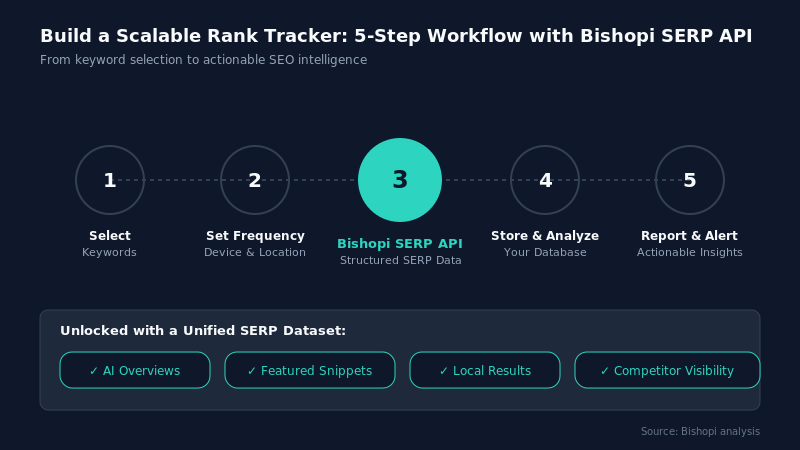
Start Tracking Your Rankings Today — Rank Tracker API analysis
With a simple workflow, you can create a scalable tracking system that grows from a handful of keywords to thousands without being locked into a third-party dashboard.
More importantly, rank tracking becomes part of your broader SEO intelligence stack. Beyond positions, you can monitor AI Overviews, featured snippets, local results, and competitor visibility from the same dataset. That means better reporting, faster alerts, and smarter optimization decisions.
If you're looking for a reliable data source to power that workflow, the Bishopi SERP API provides structured SERP data across devices, locations, and search engines, making it easier to build accurate, automated rank-tracking systems without unnecessary complexity.
FAQs
What is the best rank tracker with API access?
A solid rank tracker combines accurate SERP data, flexible query options, historical storage, and automation.
Building your own tracker using a SERP API gives you full control over keyword tracking, reporting, locations, devices, and update frequency while avoiding the limitations of traditional SaaS platforms.
Can I build a SERP checker for multiple keywords?
Yes. A SERP checker for multiple keywords simply loops through a keyword list, queries the API for each term, extracts ranking positions, and stores the results. This approach scales efficiently from dozens to thousands of keywords while supporting automated reporting, alerts, and historical trend analysis.
How often should I run daily rank tracking?
For most websites, running rank tracking once per day is sufficient. Daily checks provide consistent visibility into ranking movements without generating unnecessary API requests.
Highly competitive industries may benefit from more frequent monitoring, but daily tracking remains the standard for reliable SEO performance measurement.
Can I track local rankings?
Yes. Most SERP APIs allow you to specify geographic locations, enabling accurate local rank tracking.
By querying search results from different cities, regions, or countries, you can monitor local SEO performance, compare visibility across markets, and identify location-specific ranking opportunities more effectively.
What additional data should I monitor besides rankings?
Beyond rankings, monitor AI Overviews, featured snippets, People Also Ask boxes, competitor URLs, local pack results, and device-specific SERPs.
Tracking these elements provides deeper insight into search visibility, helps uncover new optimization opportunities, and reveals how SERP features impact organic traffic potential.
Originally published at: bishopi.io
Stay up to date
Get updated with all the news, update and upcoming features.