Build an Automated Backlink Monitoring System with a Backlinks API
Google Search Central is clear on one thing: for the vast majority of websites, you don't even need the disavow tool.
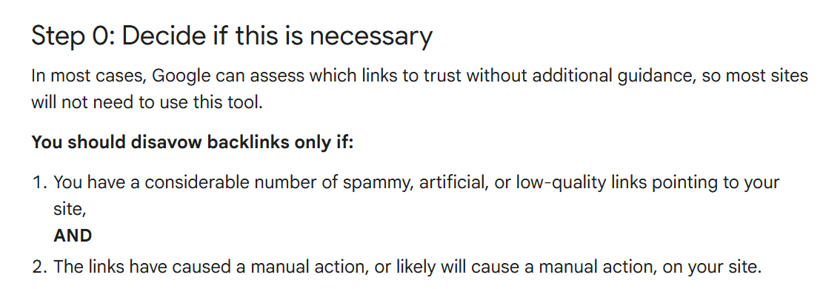
That might make it seem like backlink audits are a thing of the past. If search engines already filter out the noise, why spend time digging through your profile?
Because Google's systems aren't solving your problem.
They can quickly filter obvious spam for rankings but they won’t give you the full picture. You'll have no idea if your backlink profile is quietly shifting, which new domains deserve a closer look, or when a bunch of “harmless” links start forming a pattern that could bite you later.
If you want those answers, you need your own process. Most standard backlink audit workflows fall flat here. They dump thousands of links into a spreadsheet and leave you to figure out what actually matters. Or give you a toxicity score without deep context.
This workflow starts from the raw signals with Backlinks API — so you can adjust the model as Google evolves, not wait for tools to update their algorithm.
Does Backlink Monitoring Matter in 2026?
Yes. Google becoming better at handling link spam didn't make backlink monitoring obsolete. It narrowed its purpose.
Google automatically detects most low-quality links, so they don't need your attention. The real goal of monitoring is the cases where several individually harmless-looking signals start pointing in the same direction.
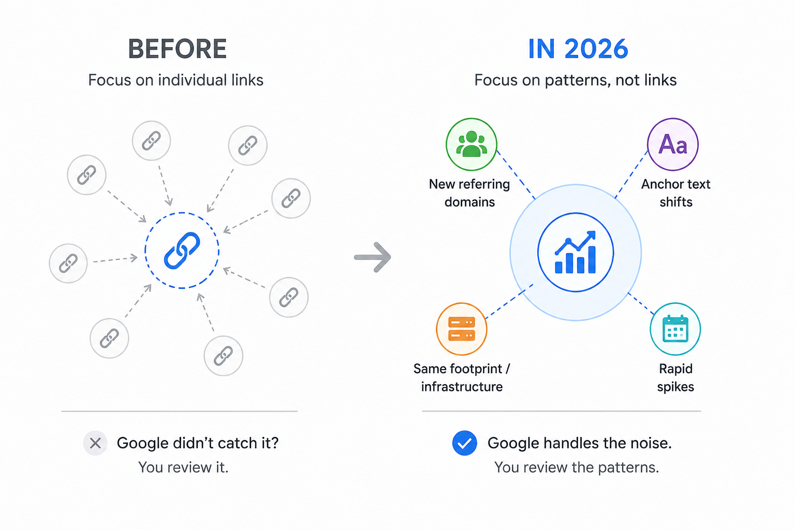
You're looking for the structural shifts: A sudden influx of thirty new referring domains in a single week. A rapid drift toward commercial anchor text. Multiple unrelated websites linking to you in the exact same footprint.
The focus shifts from chasing single links to identifying the root cause of these trends. Profiles change daily, and most of those updates are completely harmless. The shifts that actually warrant a closer look almost always show up as a broader pattern.
What Is a Toxic Backlink?
A backlink is toxic if it exists solely to manipulate search rankings rather than reference useful content.
However, don't confuse a weak link with a toxic one. A low-authority blog with minimal traffic isn't an automatic problem—Google’s systems simply ignore obvious link spam. Real risk comes from systemic patterns across your profile, not individual low-tier links.
Topical relevance gets overweighted too. A gardening blog linking to a SaaS tool looks odd, but odd isn't toxic — plenty of legitimate links happen outside a site's core niche.
The pattern to watch for is irrelevance combined with the other signals above, not irrelevance on its own.
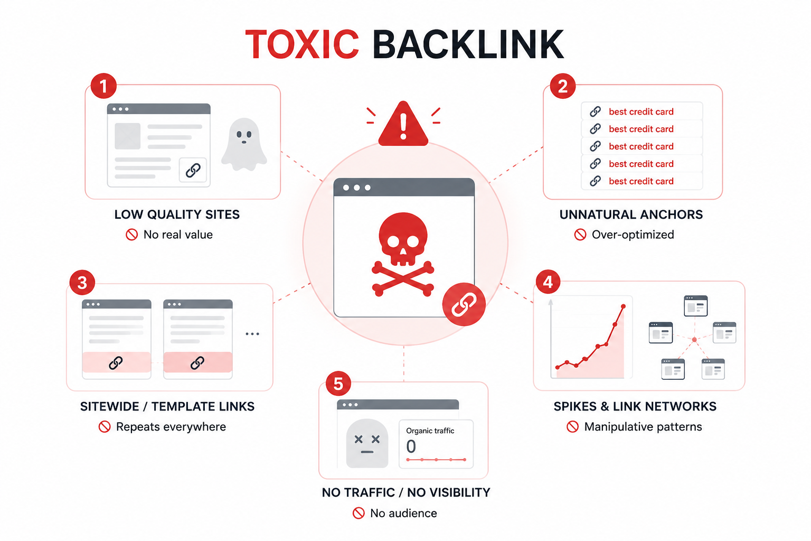
Here are the typical red flags that trigger search engines to suspect link manipulation:
Spammy or Low-Tier Domains: These are websites built solely for hosting backlinks, offering zero actual value or original content to real readers.
Forced Anchor Text: When a massive chunk of your backlinks uses the exact same commercial keyword phrases, it looks incredibly artificial instead of earned.
Template and Sitewide Links: Getting a link dropped into a footer, sidebar, or global template means it repeats across hundreds of pages, which yells "paid placement."
Spike Patterns & Connected Networks: Search engines notice if you suddenly gain a massive burst of links out of nowhere, or if your links come from websites that share the same IP addresses and hosting infrastructure.
Ghost-Town Sites: Links coming from domains that have zero organic search traffic, no visibility on Google, and a complete lack of genuine editorial standards.
I've seen audits flag a legitimate niche forum as a ghost-town site because its traffic tool showed zero visibility — turns out it ran on a subdomain the traffic tool wasn't tracking. One red flag rarely tells the whole story; that's the entire argument for scoring combinations instead of single signals.
Why Run a Link Building Audit?
A link building audit applies consistent criteria across your entire profile, making it easy to spot coordinated link networks, track systemic risks, and document exactly why a domain should be investigated or disavowed.
What Data Does a Backlink API Return?
Most SEO tools show you a pre-digested risk score. That's fine until their algorithm doesn't match your situation — or until Google changes something and the tool takes three months to update its model.
I'd rather work from raw data. A solid Backlinks API gives you all the building blocks:
Field | What it tells you | Useful for |
Source domain & URL | Where the link comes from | Networks, directories, patterns |
Target URL | Which of your pages it points to | Concentration issues |
Anchor text | The clickable text | Over-optimization |
Domain quality/spam | Third-party metrics | Prioritizing reviews |
Follow/nofollow | Whether it passes value | Real link value |
First seen / last seen | When it appeared or vanished | Spikes and campaigns |
Link type | Text, image, redirect, etc. | Unusual behavior |
Estimated organic traffic | Whether the site gets real users | Link farms |
Here's what a single record from a Backlinks API looks like:
{
"source_domain": "example-directory.com",
"source_url": "https://example-directory.com/listing",
"target_url": "https://yourdomain.com/pricing",
"anchor_text": "best crm software",
"follow": true,
"spam_score": 41,
"organic_traffic": 18,
"first_seen": "2026-05-08",
"last_seen": "2026-06-26",
"link_type": "text"
}
Notice there's no "toxic": true field. That call is yours. The raw fields give you the evidence; you build the conclusion. And that means your logic can evolve as Google evolves, without waiting for someone else to push an update.
The fields that matter most for pattern detection: anchor_text (are multiple domains using the same commercial phrase?), first_seen (did these appear in a cluster?), organic_traffic (is there a real audience here?), and spam_score (obvious spam classifier flag).
Pull back all this data via Bishopi Backlinks API — the full schema is in the docs.
The Backlink Scoring Model: How Do You Find Bad Links?
I've tried eyeballing backlink profiles. I've tried third-party toxicity scores. Neither scales and neither is consistent across audits, or across reviewers. What actually works is a weighted scoring model that produces a number, and a number that puts each domain into a tier.
Here's the one I run:
Signal | Score |
Spam score above 60 | +30 |
Link from a known network or shared IP block | +25 |
Exact-match commercial anchor text | +20 |
Domain organic traffic under 100/month | +15 |
Domain rating under 10 | +15 |
Sitewide footer or sidebar placement | +10 |
Nofollow | −20 |
And the tiers those scores map to:
Score | What to do |
0–20 | Monitor — no action now |
21–50 | Pull it into manual review |
51+ | Disavow candidate |
The directory example above: spam score 61 (+30), exact-match anchor (+20), DR 7 (+15), 18 monthly visitors (+15), followed link (no deduction). That's 80 points. Clear disavow candidate.
If you want to run this programmatically against a full API pull:
function scoreBacklink(link) {
let score = 0;
if (link.spam_score > 60) score += 30;
if (link.known_network) score += 25;
if (link.anchor_type === "exact_match_commercial") score += 20;
if (link.organic_traffic < 100) score += 15;
if (link.domain_rating < 10) score += 15;
if (link.link_placement === "sitewide") score += 10;
if (!link.follow) score -= 20;
return score;
}
const tiers = { monitor: [], review: [], disavow: [] };
backlinks.forEach(link => {
const score = scoreBacklink(link);
if (score <= 20) tiers.monitor.push(link);
else if (score <= 50) tiers.review.push(link);
else tiers.disavow.push(link);
});
The real win here is absolute transparency.
When a client asks why a specific domain is on the blocklist, you can directly answer the exact combination of signals that triggered the score. It makes your process entirely defensible.
Also Read: Backlink API vs Manual Link Analysis
One More Thing: Check Your Anchor Distribution
But don't stop at individual link metrics. You also need to watch for macro patterns across the whole profile. If 25% of your referring domains use the exact same commercial keyword as anchor text, a standard scoring model won't catch it—simply because each link looks clean when evaluated in a vacuum.
Across backlink audits I’ve run, a typical, organic anchor profile usually leans heavily into brand signals rather than commercial intent:
Branded (40–60%): Variations of the company name.
Naked URL (15–25%): Direct web addresses.
Generic (10–20%): Natural phrases like "click here" or "source."
Exact-match commercial (Under 10%): Highly targeted keyword phrases.
If exact-match anchors climb past 20% across your referring domains, it's worth reviewing the broader profile—even if individual domain metrics look completely healthy.
Traditional platforms show this in a dashboard, but pulling raw data from the Backlinks API lets you automate the math. You can bake these thresholds right into your workflows to flag risks automatically.
Pull your data and run this model with the Bishopi Backlinks API →
How Do You Set Up Backlink Monitoring on Auto-Pilot?
Here's the thing about a backlink audit: it's a photograph. It shows you what your profile looked like on the day you ran it. By next week, new domains have been linked to you. Some of them might be fine. Some of them might be the start of something that compounds.
This is the cadence I've settled on:
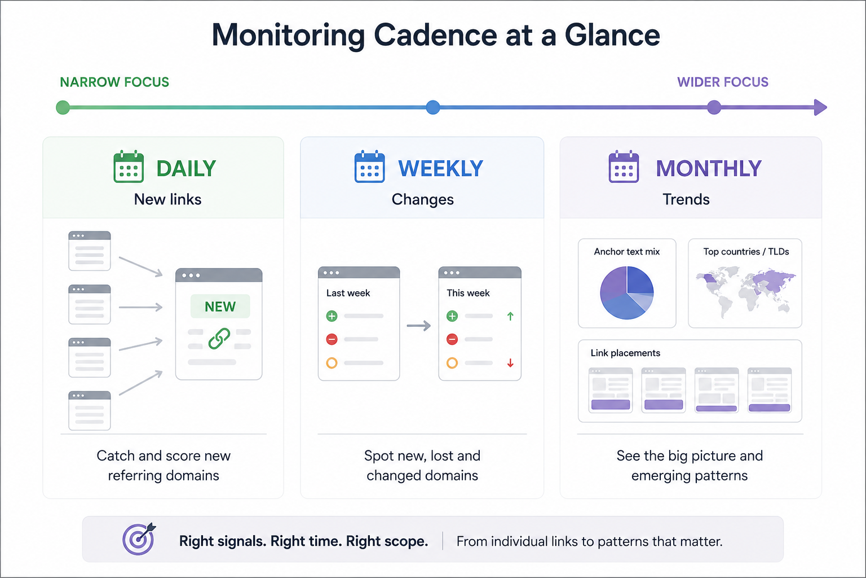
Daily. Pull new referring domains from the API. Score them immediately. Anything that crosses 50 goes into the review queue without waiting.
Weekly. Run a delta check. Which domains appeared or disappeared? Which ones changed score because their spam rating updated, or because the anchor text changed? Which ones crossed a tier boundary since last check?
Monthly. Look at the macro picture. Has the exact-match anchor ratio shifted? Is there a new country or TLD appearing disproportionately? Are you suddenly getting sitewide links from a cluster of similar-looking domains? These trends are invisible week-to-week and obvious month-to-month.
When something lands in the 21–50 review tier, I don't treat it as urgent — I batch those into a weekly fifteen-minute pass rather than reacting link-by-link. The daily discipline is for catching score spikes, not for working the queue in real time.
Most backlinks never need another decision once they're scored. The automated backlink monitoring system exists to surface the ones that do — and to keep your manual review queue small enough that you'll actually work through it.
When Should You Actually Use the Disavow Tool?
Less often than people think. Google now automatically catches the obvious stuff, so you only check the disavow file for patterns, not for the occasional ugly link that shows up in every profile.
A single spammy comment-spam link or a one-off scraper site isn't a disavow trigger — Google's classifiers already discount it before it ever touches your rankings.
Where disavowal is actually warranted:
You've confirmed a coordinated link campaign
You have an active manual action tied to unnatural links
Your audit has surfaced a pattern of manipulative links that you believe poses a genuine penalty risk.
Those cases are real — they're just not as common as the SEO industry sometimes implies.
The other thing people get wrong: the disavow file should document decisions you've already made, not a first draft of your risk assessment. By the time you generate the file, the investigation is done.
To generate it from your scored data: filter the 51+ tier, manually review any edge cases, and format using Google's syntax:
# Disavow — yourdomain.com — June 2026
domain:link-network-example.com
domain:footer-farm-xyz.net
One domain per line. Use domain: rather than individual URLs — it catches everything past and future from that domain in a single entry.
If you've used traditional backlink tools, the export report format is identical. The difference is that a file generated through Bishopi traces every domain back to a scored set of signals. Six months from now, when someone asks why that domain is in there, you have a clear answer.
Generate a disavow file from your audit with Bishopi →
What Should a Backlink Audit Report Include?
What goes in the report shifts with who's reading it. A client wants the executive summary and the action list — they don't need the full domain-by-domain table. An internal technical stakeholder wants the opposite: the raw scored list so they can sanity-check the model themselves.
Regardless of the audience, every backlink audit report should answer three questions immediately:
How many backlinks were reviewed?
How many require action?
What changed since the previous review?
I keep it to five sections:
Section | What it should include |
Executive summary | Total backlinks reviewed, risk tier breakdown, key findings, and recommended actions. |
Anchor text analysis | Distribution of branded, exact-match, partial-match, generic, and naked URL anchors to identify unusual shifts. |
High-risk domains | Referring domain, anchor text, risk indicators (such as spam score), reason for review, and recommended action. |
Recommended actions | Domains to disavow, backlinks requiring manual outreach, and links that should remain under observation. |
Changes since the last report | New referring domains, lost backlinks, movements between risk tiers, notable anchor text changes, and significant shifts in domain quality. |
Bishopi's Backlink Analysis Tool exports this structure directly — including the anchor text distribution chart and the scored domain table. Pull your first report free.
FAQ
1. What is a backlink audit?
A backlink audit is a health check for your site's link profile. You are looking at who is pointing to you, checking if those links actually make sense, and figuring out if any of them carry search penalty risks.
2. What makes a backlink toxic?
Almost no backlink looks toxic on its own. A directory link, an exact-match anchor, or a low-traffic domain isn't unusual by itself. The interesting cases are the ones where several weak signals begin reinforcing each other. That's when a backlink deserves a closer look.
3. How often should I audit backlinks?
Run one full backlink audit to establish a baseline. From there, monitor new referring domains and changes to your existing links as they happen. Review broader trends like anchor text distribution and referring domain diversity each month to keep the backlink profile in context.
4. Should I still use Google's disavow tool in 2026?
For everyday site maintenance, skip it entirely. You should only touch the disavow tool if you are dealing with a severe, deliberate footprint of manipulative backlinks that have triggered (or are highly likely to trigger) an explicit Manual Action in Search Console.
5. Why does anchor text distribution matter?
Anchor text shows how other websites describe your pages. A profile dominated by branded, URL, and naturally descriptive anchors is generally a healthy sign. Large shifts toward exact-match commercial anchors deserve a closer review, especially when they appear alongside other unusual backlink patterns.
6. What's the difference between a one-time backlink audit and ongoing backlink monitoring?
The best backlink research tools treat audits as the starting point, not the finish line. An audit establishes your backlink baseline. Continuous monitoring surfaces every meaningful change afterward, including new and lost backlinks, anchor text updates, referring domains, and shifts in link quality.
7. What does a backlink API return?
Every provider exposes slightly different fields, but most APIs include the referring domain and URL, destination URL, anchor text, follow status, first and last seen dates, link type, and quality metrics for the referring site.
Make Better Backlink Decisions
A one-off link audit helps, but ongoing visibility is what keeps a profile healthy. Clean link profiles evolve over time, and tracking that growth lets you stay ahead of any unwanted changes.
Establishing a routine makes it easy to spot trends early. You can easily see when new clusters of domains appear or when your anchor text balances start to shift, keeping your optimization strategy entirely on track.
This setup—connecting raw data to a custom scoring model—automates the heavy lifting so you can focus on strategy rather than manual dashboard checks.
Next Steps
Build your own pipeline: Connect directly to the Bishopi Backlinks API to access full schema and raw fields.
Get reports instantly: Use the Bishopi Backlink Analysis Tool to analyze anchor distribution and view scored recommendations right away.
Originally published at: bishopi.io
Stay up to date
Get updated with all the news, update and upcoming features.