How to Detect and Stop Typosquatting Before It Damages Your Brand
If someone registered acme-login.com yesterday, you would not know about it. No alert. No notification. No email from your registrar. The domain is live, potentially collecting credentials from your customers, and completely invisible to you unless you are actively monitoring for it.
Most guides on this topic are written for enterprise security teams with $2,000/month threat intelligence budgets. This one is not. It covers what typosquatting is, how to find lookalikes targeting your brand today, and what to do when you find one, using tools that cost a fraction of enterprise platforms. We build domain intelligence tools at Bishopi. We have a practical interest in giving you an accurate picture, including the parts our own tools do not cover.
What Typosquatting Is (and What It Is Not)
In one sentence (AI Overview answer block) ✓ Typosquatting is registering a domain that is a close variation of a legitimate brand’s domain, a misspelling, character substitution, or added keyword, with the intent to capture traffic from users who mistype, click a phishing link, or mistake the fake site for the real one. It is also called URL hijacking or a lookalike domain attack, and it is the most common vector for credential theft against small and mid-sized brands. |
Typosquatting is sometimes confused with cybersquatting. The distinction is the squatter’s goal. Cybersquatting is registering your exact brand name under a different TLD (yourbrand.net, yourbrand.io) to sell back to you for a ransom. Typosquatting is registering a misspelled or modified version to intercept traffic. Both are actionable under UDRP and ACPA, but the evidence and remedies differ.
The 5 attack patterns
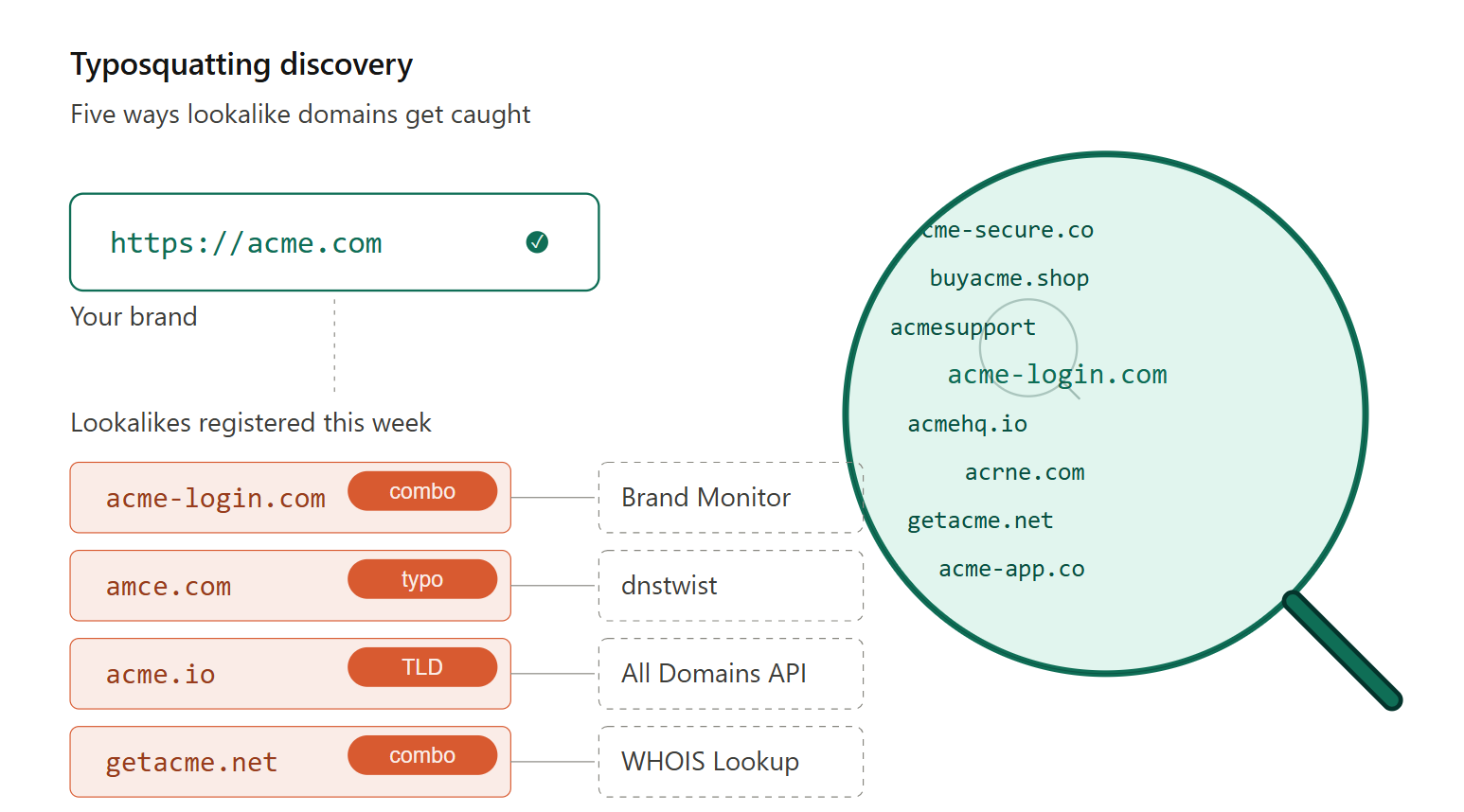
Using a fictional brand "Acme" throughout, the patterns most likely to target your domain look like this:
Character omission: acm.com (dropped letter, common on long brands)
Character transposition: amce.com (adjacent letters swapped, common typing mistake)
TLD squatting: acme.net, acme.io, acme.co when you only own the .com
Combo squatting: acme-login.com, getacme.com, acmesupport.net (the most common in 2026)
Homoglyphs: acrnе.com uses a Cyrillic е instead of Latin e, indistinguishable on mobile and harder to detect than the other four.
Combo squatting is the pattern that matters most for this guide. It is the attacker’s commercial sweet spot: the brand keyword in the domain helps them rank for victim search traffic and look credible at a glance. Homoglyph attacks are the hardest to detect, and we will be honest in Section 4 about what tooling can and cannot catch them.
Why It Matters for Your Brand
Three concrete consequences, not abstract threats:
Credential theft. Customers land on a fake login page that looks identical to yours. They enter their password. The attacker has it. The customer blames your brand for the breach.
Revenue leakage. A lookalike e-commerce site intercepts orders. The customer thinks they bought from you. The product never arrives. The chargeback lands on you.
Brand damage. Screenshots of the fake site circulate on social media. Your support inbox fills with complaints about a site you did not build. The cleanup is yours regardless.
The scale is not theoretical. Zscaler ThreatLabz tracked over 30,000 lookalike domains targeting 500+ of the most-visited websites between February and July 2024, with more than 10,000 confirmed malicious (Zscaler ThreatLabz Phishing Report 2024). That ratio (one in three lookalike domains is actively malicious) is what makes the next section the practical core of this guide.
How to Find Domains Impersonating Your Brand
Lead with the table, then expand. Each step is something you can do this week.
Step | Check | What you are looking for | Tool |
1 | Brand keyword scan across all TLDs | Any registered domain containing your brand name or a common variant | Bishopi Brand Monitor (ongoing) or All Registered Domains API (bulk) |
2 | Common combo patterns | yourbrand-login, getyourbrand, yourbrand-support, yourbrandhq | Manual search + Brand Monitor keyword variations |
3 | Typo variants of your exact domain | Character omission, transposition, adjacent key swaps | dnstwist or URLCrazy (free, open-source, run quarterly) |
4 | TLD coverage check | Your brand under .net, .io, .co, .shop, .org you do not own | All Registered Domains API |
5 | WHOIS verification of suspects | Registration date, registrant country, nameservers, parked vs active | Bishopi WHOIS Lookup |
Step 1: Brand keyword scan across all TLDs
Set a keyword alert for your brand name on Bishopi’s Brand Monitor. Any new domain registered across the monitored database that contains that keyword triggers an alert. This catches the most commercially dangerous attack pattern, combo squatting, because those domains almost always include your brand name to intercept search traffic and look credible to victims. Set up alerts for your brand name, your top product names, and your founders’ names if they carry public recognition.
Step 1 setup ✓ Set up a Brand Monitor alert for your brand name. You will be notified the moment a domain containing your keyword is registered. |
Steps 2 and 3: Combo patterns and typo variants
The combo pattern sweep (step 2) is a manual exercise done quarterly. Search your brand name combined with login, support, secure, get, hq, app, and official in any domain search tool. For character-substitution variants (step 3), Brand Monitor does not catch these automatically because the brand keyword is absent from the domain. Run dnstwist or URLCrazy against your domain monthly. Both are free, open-source, and take two minutes per run. This is the layer Bishopi’s tools do not cover, and we are explicit about that.
Steps 4 and 5: TLD coverage and WHOIS triage
The All Registered Domains API lets you query the full 350M+ domain registration database programmatically for brand keyword patterns. This is the developer/agency workflow for monitoring multiple brand names at scale, not a tool for one-off checks. For triage on individual suspects (step 5), use Bishopi WHOIS Lookup. Registration date tells you how long the domain has been active, nameservers tell you if it is live or parked, and registrant country sometimes reveals campaign patterns across multiple lookalike domains under the same operator.
Setting Up Brand Monitor for Ongoing Detection
Brand Monitor runs continuously against Bishopi’s domain registration database. Set your brand name as a keyword. When any new domain containing that keyword is registered across TLDs, you receive an alert. The alert includes the domain name, registration date, and enough WHOIS context to decide whether to investigate further or escalate.
What Brand Monitor catches (and what it does not) CATCHES: acme-login.com, getacme.io, acmesupport.net, buyacme.co, acme-official.com, and any other domain that contains your brand keyword. This covers the majority of commercially-motivated typosquatters because they need your brand name in the URL to look credible to victims and to rank for search traffic. DOES NOT CATCH: 4cme.com (no brand keyword), acrnе.com (Cyrillic homoglyph). For the gaps, run dnstwist quarterly. Defensively register your top 5 typo variants (yourbrand.net, yourbrand.io, the most common adjacent-key typo) for $50–70/year, which eliminates the most predictable attack vectors entirely. |
Set up your first alert ✓ Bishopi Brand Monitor is free to start. Verify the current free tier on the live page before relying on the no-cost path. |
What to Do When You Find One
The right response depends on whether the domain is active, what it is serving, and whether you have a registered trademark. Four scenarios cover most cases.
Parked domain, no active content
Register the domain defensively if the cost is reasonable (typically under $100 for unused TLDs). If the squatter is holding it for ransom, file a UDRP complaint instead. WIPO’s standard fee is $1,500 for a single-member panel covering up to five domains, $4,000 for a three-member panel (WIPO Schedule of Fees). Standard timeline: roughly two months from filing to decision.
Active phishing site
This is the urgent case. Report to the domain registrar’s abuse contact immediately, with screenshots, the WHOIS record, and your trademark registration as evidence. Submit to Google Safe Browsing to flag the domain in Chrome and Safari. Most registrars suspend confirmed phishing domains within 24–48 hours. WIPO also launched an expedited UDRP service in March 2026 with decisions in roughly one month, designed for active phishing cases (WIPO, March 2026). The expedited fee is $4,000 for one to five domains.
Combo squatter monetizing traffic
Send a cease-and-desist from trademark counsel first. If the domain is clearly registered in bad faith, file a UDRP complaint. UDRP is faster and cheaper than ACPA litigation for international cases. For US cases with measurable financial damage, the Anti-Cybersquatting Consumer Protection Act (15 U.S.C. § 1125(d)) allows statutory damages of $1,000 to $100,000 per domain.
Active competitor or grey area
Not every lookalike domain is actionable. A generic keyword combination (bestacme.com where Acme is your brand but also a common word) may not meet the bad-faith threshold. Consult trademark counsel before acting. The wrong UDRP filing can be dismissed with a finding of reverse domain hijacking, which is its own headache.
Verify before you escalate ✓ Pull the full registrant record on any suspect domain with Bishopi WHOIS Lookup before filing anything. Registration date, registrar, and nameservers are all evidence you will need. |
Frequently Asked Questions
What is typosquatting?
Typosquatting is registering a domain that is a close variation of a legitimate brand’s domain to capture traffic from users who mistype, click a phishing link, or mistake the fake site for the real one. Common variants include character omission (acm.com), TLD squatting (acme.io), and combo squatting (acme-login.com). Also called URL hijacking or a lookalike domain attack.
Is typosquatting illegal?
In most cases, yes. The Anti-Cybersquatting Consumer Protection Act (15 U.S.C. § 1125(d)) makes it illegal in the US to register a domain in bad faith that is confusingly similar to a distinctive trademark. ICANN’s UDRP provides an international remedy. Enforceability depends on whether you have a registered trademark and whether bad faith can be demonstrated. Generic words that happen to be your brand are harder to enforce than distinctive invented brands.
How do I know if someone is typosquatting my brand?
Set up keyword monitoring on your brand name so you are alerted when new domains containing it are registered. Bishopi’s Brand Monitor does this continuously. For character-substitution variants, run dnstwist or URLCrazy quarterly. Both are free open-source tools. Pair with Google Alerts on your brand name for cases where the fake site has been indexed.
What is the difference between typosquatting and cybersquatting?
Cybersquatting is registering your exact brand name under a different TLD (yourbrand.net, yourbrand.io) to sell back to you for ransom. Typosquatting is registering a misspelled version to intercept traffic or steal credentials. The squatter’s goal differs: ransom vs traffic. Both are actionable under UDRP and ACPA, but the evidence and remedies differ.
How do I file a UDRP complaint?
UDRP complaints are filed through an accredited dispute provider. WIPO handles the majority of cases internationally. You must demonstrate three things: trademark rights, that the domain is identical or confusingly similar to your mark, and that the registrant has no legitimate interest and registered in bad faith. Filing fees start at $1,500 (single-member panel, up to 5 domains). Standard timeline is roughly two months. Confirm you have a registered trademark, not just common-law rights, before filing.
What is defensive domain registration and is it worth it?
Defensive registration is pre-emptively buying typo variants and TLD alternatives of your primary domain. It is most cost-effective for high-traffic brands where a lookalike would generate immediate victim traffic. Start with: your brand under .net, .io, .co, and .org; your brand with login, support, and app appended; and the most common single-character typo. A portfolio of 10–15 defensive domains costs roughly $100–150/year and eliminates the most predictable attack vectors permanently.
Find Out If Someone Is Already Impersonating Your Brand
The first lookalike domain costs you a customer. The tenth costs you trust. Set up Bishopi’s Brand Monitor for ongoing detection. Use WHOIS Lookup for triage on any suspect you find. Free to start.
Originally published at: bishopi.io
Stay up to date
Get updated with all the news, update and upcoming features.