How to Detect Lookalike Domains and Stop Brand Impersonation
Most people can’t spot the difference at a glance:
There’s just a lowercase “r” + “n” mimicking an “m” - and it worked. This domain was used in a real phishing campaign with password reset emails pointing to a cloned Microsoft login page.
Legitimate: microsoft.com
Phishing: rnicrosoft.com
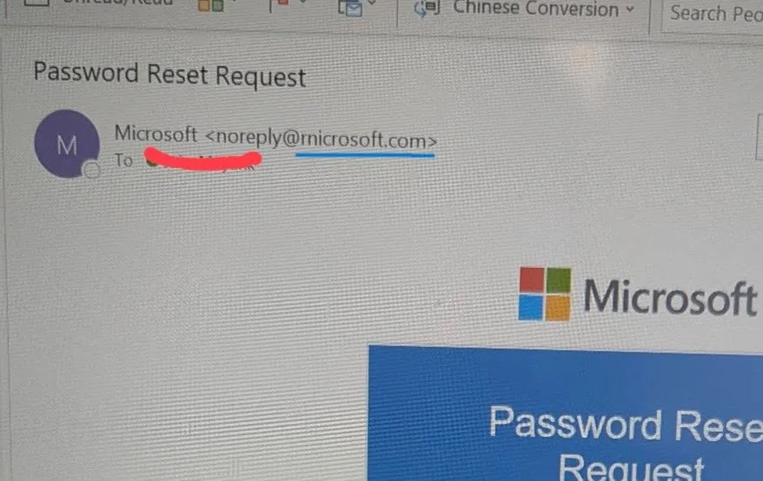
Image via Cybersecuritynews
That’s why lookalike domain detection is tricky. Attackers don’t need to be sophisticated - just believable enough that no one looks twice.
In most cases, nobody is hacking your actual site. They’re registering something close enough to your brand to fool a customer, employee, or vendor.
Manual tools like dnstwist work for one domain, but once you’re protecting multiple brands, regions, executives, and login portals, you need a proper system.
This guide walks through what that system looks like in practice: which signals actually matter, how to reduce false positives, where open-source tools fall short, and when it makes sense to use a domain monitoring API.
What Is a Lookalike Domain?
A lookalike domain is built to borrow the trust your brand has already earned. It looks familiar enough to pass a quick glance - whether through typosquatting, visual character swaps, trust-heavy business terms, or domains that mimic real operational infrastructure.
The whole play is trust transfer. Attackers want a customer, employee, vendor, or finance approver to believe they're in the right place long enough to click, sign in, approve, or pay.
Once you map the patterns, the scale becomes clear. Here's what lookalike variants around google.com can look like in practice:
Lookalike Domain Pattern | Example | What’s happening |
Character substitution | goggle.com | One character changes, but the visual shape stays familiar enough to earn trust. |
Character omission | gogle.com | A missing letter that the brain fills in automatically. |
Character addition | googgle.com | Extra characters blend into a familiar word shape. |
Transposition | googel.com | Adjacent letters flip, but most people still read the intended word. |
Adjacent-key typos | foogle.com | Built around believable keyboard mistakes, which makes them feel natural. |
*Homoglyph / IDN homograph | gooɡle.com | Characters from another script render almost identically to the real domain. |
Combosquatting | google-login.com, secure-google-verify.com | Adds business language that makes the domain look operationally legitimate. |
TLD swap / doppelganger | google.co, wwwgoogle.com | Keeps brand recognition intact while changing the destination. |
Bitflip domains | goohle.com | Rare infrastructure-level edge case where low-level character mutation changes routing. |
*One caveat on homoglyphs: most TLD registries now reject mixed-script Unicode registrations, which makes pure IDN homograph attacks harder to register than the example above implies. The real-world risk is lower than the other patterns in this table.
Attackers mix these techniques. That's why brand impersonation monitoring isn't just about catching typos - you need to anticipate every class.
How Do You Protect Against Lookalike Domains? The 5-Stage Brand Protection Workflow
I built this workflow after seeing how difficult lookalike domains become to track at scale.The goal is to identify suspicious and high-risk domains before they turn into active threats.
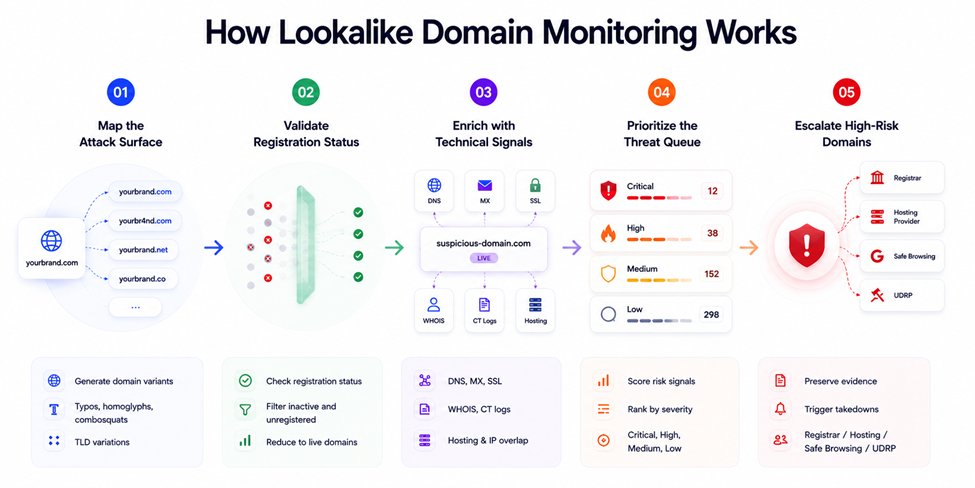
Stage 1: Map the Attack Surface
Start with your core brand domains, then generate typo variants, homoglyphs, combosquats, keyboard swaps, and TLD variations.
The first pass usually creates 5,000+ candidate domains. Expand combinations and TLD coverage aggressively, and that number climbs past 50,000 very quickly.
There are a few common ways teams approach this:
dnstwist is where many security engineers start because it is reliable, scriptable, actively maintained, and outputs clean JSON.
dnstwist --registered --format json yourbrand.com > candidates.json
CIRCL's Typosquatting Finder from the Computer Incident Response Center Luxembourg goes broader on homoglyph and IDN coverage, with 21 permutation algorithms.
It exposes both a web UI and an API, and integrates with MISP threat-intel feeds — so it fits as a one-off scan tool and as a pipeline input.
Once the permutations exist, the next decision is where to check them.
Scanning only .com misses most of the problem but scanning all ~1,500 active TLDs creates too much noise.
The practical set is the TLDs tied to your actual exposure: .com, .net, .org, .co, your ccTLD, and the regions where you actively operate.
Bishopi's Domains Search covers 1,000+ TLDs in one query - useful here once you've defined your target set.
Stage 2: Validate Registration Status
This is the first major filter. Out of thousands of candidates, the vast majority are unregistered. Those aren’t active threats — they’re potential defensive registrations.
Running individual WHOIS lookups on every candidate isn’t practical. You hit rate limits, burn API credits, and waste hours on noise.
The correct pattern is bulk availability checking. This collapses your list to only registered domains quickly. In practice, 10,000 candidates might yield 50–500 registered domains. The rest get discarded or queued for periodic defensive registration review.
This stage alone dramatically reduces workload.
Most of the remaining domains are benign: defensive registrations by your own team, legitimate businesses with similar names, or domain investors sitting on expired assets.
Stage 3: Enrich with Technical Signals
By this stage, you have the suspicious domains. The next step is figuring out which ones are parked noise and which ones are preparing for active use.
A domain registered three years ago with no DNS activity is low priority. A domain registered 48 hours ago with MX records, a Let's Encrypt certificate, and hosting overlap with known phishing infrastructure deserves immediate attention.
The highest-signal enrichment data comes from a few sources:
Creation date and registrar: Fresh registrations carry higher baseline risk, especially when the registrar pattern matches previous abuse campaigns.
Start by checking when the domain was registered, whether ownership changed recently, and what the domain previously hosted. Bishopi’s Domain Age Checker pulls that context together quickly, including archived content and SEO signals.
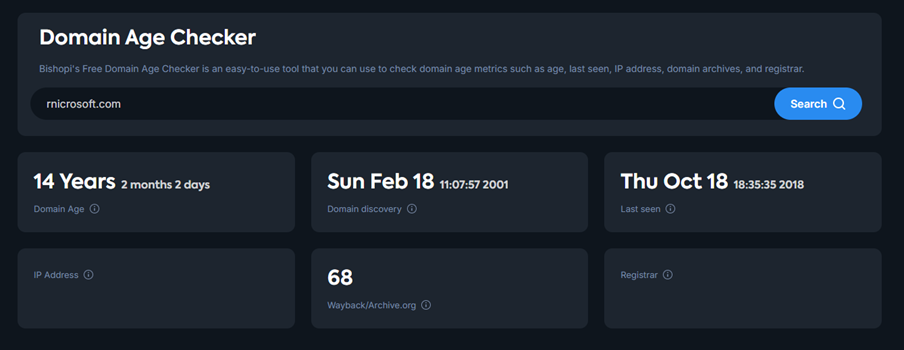
For deeper history, Domain Sales History Lookup helps surface recycled domains, pricing patterns, and repeat infrastructure activity across millions of historical records.
DNS resolution and MX records: MX records are one of the clearest phishing indicators — they signal intent to send or receive email. A lookalike domain configured for mail is a different threat category than a parked typo.
WHOIS history: Ownership changes, registrar transfers, or sudden updates to contact infrastructure often matter more than the current WHOIS snapshot.
Domain Name Analysis API surfaces current WHOIS data; historical patterns fill the gap where current records are redacted.
Reverse WHOIS and bulk WHOIS lookup: One fake domain is interesting. Twenty lookalikes tied together through shared registrant patterns, emails, or repeated infrastructure usually signals campaign activity.
DNS record history: A domain sitting dormant for years that suddenly changes name servers or adds MX records is worth escalating quickly.
SSL certificate issuance and CT logs: Fresh certificates — especially automated Let's Encrypt issuance — often appear right before phishing deployment.
Hosting and IP clustering: Shared hosting with previously flagged domains is one of the fastest ways to connect isolated detections into something larger.
Screenshots and content analysis: Useful, but expensive at scale. Most teams reserve browser rendering and screenshotting for higher-scoring candidates.
A note on GDPR: perfect registrant attribution is rare now because most WHOIS records are redacted.
Modern abuse detection workflows rely more on correlation: shared infrastructure, registrar patterns, historical WHOIS data, certificate behavior, and clusters of domains registered together.
That is usually enough. Most phishing infrastructure is repetitive once you start monitoring at scale.
Stage 4: Triage the Active Threat Set
Now the job is figuring out what actually deserves attention first.
A parked typo domain with no infrastructure is very different from a lookalike domain with MX records, active TLS, and a cloned login page.
If both end up treated the same way, the monitoring queue breaks down quickly.
Score domains based on infrastructure and abuse signals:
Resolution: Domains resolving to live infrastructure carry higher priority.
MX records configured: Email-enabled domains have higher phishing risk.
SSL certificate present: Usually indicates active infrastructure.
Recent registration: Newly registered domains have a higher base rate of abuse.
Content similarity: Cloned branding or login pages should be treated as Critical.
Registrant clustering: Shared registrants, nameservers, or infrastructure overlap often indicate coordinated abuse.
The output should be a triage queue grouped into clear priority bands: Critical, High, Medium, and Low.
A single signal (like a typo domain) is common and often low risk. What matters is how signals combine. A fresh registration with configured MX records, active hosting, and infrastructure overlap with known phishing campaigns tells a much stronger story.
Once you score domains based on combined signals, prioritization becomes clearer:
Priority | Criteria | Response |
Critical | 4+ signals, active content | Same-day investigation |
High | 3 signals, resolving | Next business day |
Medium | 1–2 signals, parked | Weekly triage |
Low | Registered only | Log and monitor |
That sorting layer makes you efficient.
A 5% false-positive rate across 200 weekly alerts is roughly 10 analyst hours lost before a real incident is even investigated.
Build a suppression list of confirmed-benign domains early, including your own defensive registrations, known legitimate overlaps, competitor domains you've already triaged.
That part is less exciting than detection logic, but it is usually what determines whether the workflow still works six months later.
Stage 5: Escalate High-Risk Domains
When a domain hits Critical, collect evidence before you do anything else.
Capture timestamped screenshots, WHOIS snapshots, DNS records, and CT log entries at the moment of detection. Domains rotate content or go dark quickly. Without preserved evidence, your UDRP or registrar abuse case weakens significantly.
Route alerts through your existing channels - Slack, PagerDuty, or Jira - with full context and recommended next actions.
Then act in parallel:
Registrar abuse contact - fastest path for clear phishing cases
Hosting provider abuse report - useful when the registrar is unresponsive
Google Safe Browsing submission - protects users in Chrome while enforcement proceeds
UDRP - this is the standard path to recover a trademarked domain. Expect to pay $4500-$11000 in filing fees and attorney fees.
Since bad faith registrations or use is common, keep a full audit trail of all evidence from the start.
WIPO Expedited UDRP (March 2026) - Designed for active phishing, fraud, and other urgent cases.
The process carries a $4,000 filing fee and targets a one-month resolution timeline, making it a better fit than standard UDRP when a live domain is actively harming your brand.
Keep a permanent record of every domain detected and actioned. Some of the most interesting detections are domains that appeared months earlier, disappeared, then came back registered with active infrastructure. You do not see those patterns unless the history stays searchable.
5 Practical Tips for Managing Lookalike Domains at Scale
I’ve implemented variations of this workflow multiple times. Here are a few considerations that usually come from painful mistakes the first time through:
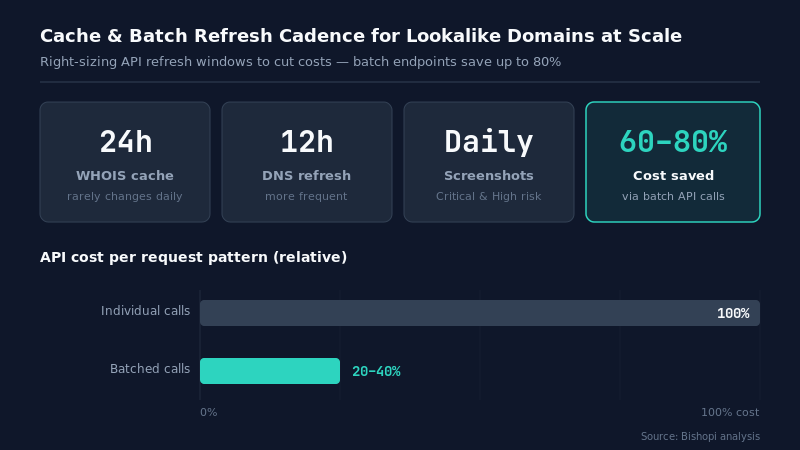
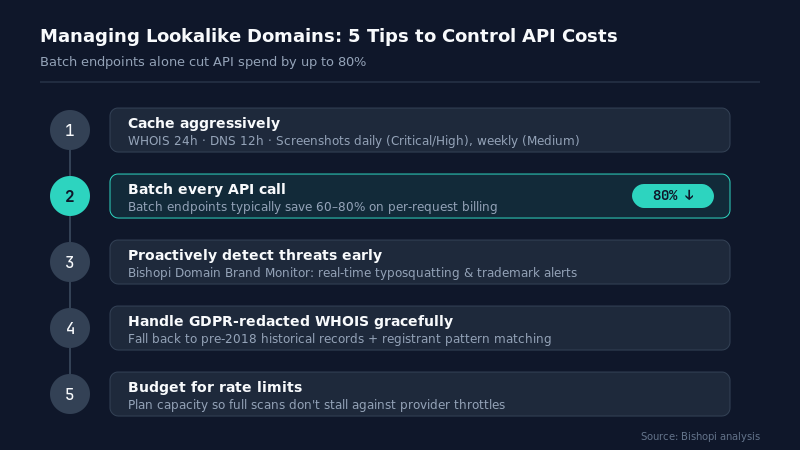
Cache aggressively. WHOIS records rarely change day to day, so constantly refreshing them just burns credits. A 24-hour cache window is usually enough.
DNS deserves more frequent refreshes, around every 12 hours. Screenshots get expensive surprisingly fast, so daily refreshes for Critical and High-risk domains and weekly refreshes for Medium usually keeps the balance right.
Batch every API call. Most domain APIs bill per request. Use batch endpoints whenever you can - they typically save 60–80% on costs.
Proactively detect threats early: Malicious domains are often registered long before fake login pages or phishing attacks appear. Set up alerts with Bishopi’s Domain Brand Monitor to track trademark matches and lookalikes in real time. Get instant notifications on typosquatting and infringements so you can respond quickly and protect your brand reputation.
Handle GDPR-redacted WHOIS gracefully: Build fallbacks for redacted data, using historical WHOIS records (pre-2018) and registrant pattern matching.
Budget for rate limits: A full daily scan of 50 brand assets at 10,000 permutations each equals 500K checks. Pick the right plan — Bishopi’s Business tier (150K credits/month) handles this comfortably, while the Start-Up plan (50K credits) works for lighter use.
Quick Check with Domain Tools API
Here's a basic availability check against a candidate lookalike using Bishopi's Domain Tools API:
Request
curl -X GET "https://api.bishopi.io/v1/domain/availability?domain=rnicrosoft.com" \
-H "Authorization: Bearer YOUR_API_KEY" \
-H "Content-Type: application/json"
Response
{
"domain": "rnicrosoft.com",
"available": false,
"registered": true,
"creation_date": "2024-11-03",
"registrar": "NameCheap, Inc.",
"mx_records": true,
"ssl_certificate": true,
"risk_score": 87,
"status": "ACTIVE"
}
When Does It Make Sense to Use a Domain Monitoring API?
The right choice isn’t really about company size. It comes down to three things: how much volume you’re monitoring, how much data depth you need, and how much work you want to own yourself.
Option 1: Build It Yourself
This works great when you’re keeping things small.
dnstwist plus free WHOIS APIs can take you surprisingly far with almost no cost. Many strong security teams stick with this approach long-term.
Best for:
Monitoring just 1–5 brand assets
Teams with dedicated engineering bandwidth
Organizations okay with handling parsing, proxies, and rate limits in-house
Option 2: Use a Domain Monitoring API
Once you scale up, generating domain lists stops being the hard part. The real pain becomes enrichment speed, bulk checks, historical data, and keeping the pipeline reliable.
This is where a domain monitoring API shines. Tools like Bishopi’s Domain Tools API handle the heavy lifting while you keep full control over your workflow and scoring.
Best for:
Monitoring 10+ brand assets continuously
Teams that need reliable bulk lookups and historical context
Organizations that want powerful APIs without maintaining the full pipeline
Quick note: Most teams find the switch from DIY to an API makes sense around $100–$300/month once engineering time is factored in.
Option 3: Go Full Enterprise
If you’re dealing with high volume or frequent attacks, consider managed platforms like Fortra, BrandShield, Netcraft, or Corsearch. These combine detection with professional takedowns and legal support.
Best for:
Teams with six-figure budgets
Companies facing ongoing phishing or impersonation campaigns
Organizations that want vendors accountable for results
Bottom line:
If you’re still manually triaging dnstwist results, your biggest bottleneck is likely enrichment and risk scoring. That’s exactly where a domain monitoring API often delivers the fastest ROI.
Frequently Asked Questions
1. How do you detect lookalike domains?
Generate variations of your brand (typos, homoglyphs, combosquatting, TLD swaps), then check which are registered and enrich them with WHOIS, DNS, certificates, and hosting data. A domain monitoring API becomes very useful once volume increases.
2. What’s the difference between typosquatting and cybersquatting?
Typosquatting uses visual tricks or typing errors (e.g. gogle.com).
Cybersquatting is intentional brand abuse (e.g. nike-store.com) for resale, traffic, or leverage. Each requires different monitoring logic.
3. Can a brand protection API detect homoglyph attacks?
Yes. Modern APIs generate homoglyph/IDN variants (Cyrillic, Greek, etc.) alongside regular typos. Bishopi’s Domain Tools API supports them across 1,000+ TLDs.
Keeping Brand Protection Sustainable at Scale
No matter whether you build it yourself or use an API, the core workflow is the same: generate variants, check registration, enrich data, score risk, and act.
At scale, alert volume grows fast and teams can get buried in manual work. Automating repetitive tasks early keeps everything manageable.
If you want to simplify this process, Bishopi's Domain Tools API is worth trying — free trial, no credit card required.
Or jump straight to check the APIs.
Originally published at: bishopi.io
Stay up to date
Get updated with all the news, update and upcoming features.