How to Check a Domain’s History Before You Buy (5-Step Framework)
The domain looks clean. The price is fair. The keywords are right. But six months ago it hosted a gambling affiliate network. Google knows. You don’t. Yet.
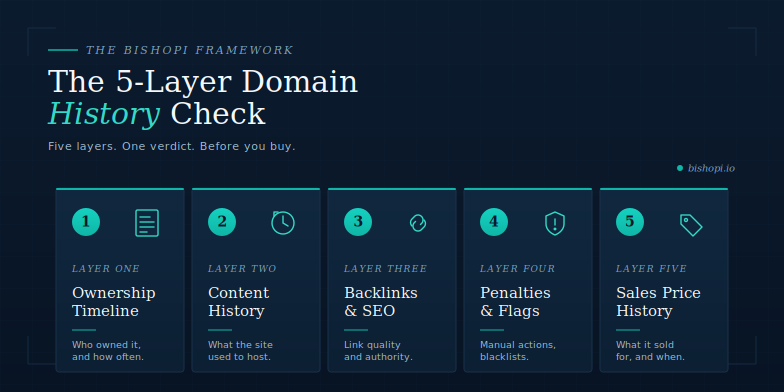
Checking a domain’s history before you buy means checking five separate layers: who owned it, what it hosted, what links point to it, whether it has any active penalties, and what it last sold for. Most guides check one or two. This covers all five, with specific tools for each, including what Bishopi covers and where it hands off to other tools.
Why Domain History Matters Before You Buy
Three concrete consequences. Each one is a recognisable business scenario, not an abstract risk.
Inherited Google penalties. A previous owner ran a link scheme. Google penalised the domain. The penalty does not reset with ownership change. You buy the domain. Your new site starts with a ranking handicap you didn’t know existed, and recovery typically takes 3 to 6 months.
Toxic backlinks. The domain was used for a spam network. Thousands of low-quality links point to it. You inherit those links. Disavowing them takes months, and in the meantime, they drag down your site’s trust signals.
Brand damage from content history. The domain previously hosted content your customers would find at odds with your brand: a competitor, a controversial site, or worse. Screenshots circulate. Wayback Machine is public. Customers find it.
What “Domain History” Actually Means
In one sentence: Domain history is not one thing. It is five distinct layers of information about a domain’s past, each stored in different databases and requiring different tools. Ownership records live in WHOIS databases. Content history lives in the Internet Archive. Backlink history lives in SEO crawlers. Penalty status lives in Google’s systems. Sales history lives in marketplace transaction records. A thorough domain history check means working through all five layers, starting with ownership and ending with price.
Two related searches the SERP often conflates: domain age and domain history. Age is a single number, the time since first registration. History is the five-layer record of what happened during that age. A 15-year-old domain with 14 years of spam content is not a good domain because it is old. The age is the container; the history is what was put in it. The distinction matters because most domain-evaluation tools surface age but not history, which leads buyers to pay age premiums on domains that have no usable equity.
If you are specifically evaluating expired domains for their backlink equity and SEO value, see our guide to finding dropped domains with real SEO value. This guide covers the pre-purchase history check for any used domain, expired or actively listed for sale.
The 5-Layer History Check
Lead with the table. Each layer follows the same pattern: what it tells you, how to check it, what Bishopi covers, and what external tool covers the gap.
# | Layer | What you learn | Bishopi tool | External tool |
1 | Ownership timeline | How many owners, recent registrations, gaps | WHOIS Lookup + Domain Age Checker | WhoisFreaks (free) or DomainTools (paid) |
2 | Content history | What the site hosted across ownership periods | Domain Age Checker (Wayback integration) | web.archive.org directly |
3 | Backlink and SEO history | Link quality, spam patterns, authority | Domain SEO Analysis | Ahrefs / Moz (supplemental) |
4 | Penalty and blacklist status | Manual actions, Safe Browsing flags, spam score | Domain SEO Analysis | Google Transparency Report |
5 | Sales price history | Previous transactions, market value | Domain Sales History | NameBio (complementary) |
Layer 1: Ownership timeline
Start with Bishopi’s WHOIS Lookup for the current snapshot: creation date, current registrant, registrar, expiry date. These answer the first questions: how old is it, who owns it now, and when does it expire. Then look at registration history with Domain Age Checker for archived snapshots and IP history.
What Bishopi covers, and what it does not CURRENT WHOIS only. Bishopi’s WHOIS Lookup shows the live snapshot: who owns it now, registrar, dates. For the full ownership transfer timeline (every registrant change since registration), use a dedicated WHOIS history tool. WhoisFreaks offers free manual lookups. WhoisXML API has a free tier limited to the last three records. DomainTools is the enterprise standard but no longer offers a permanent free tier as of 2026. |
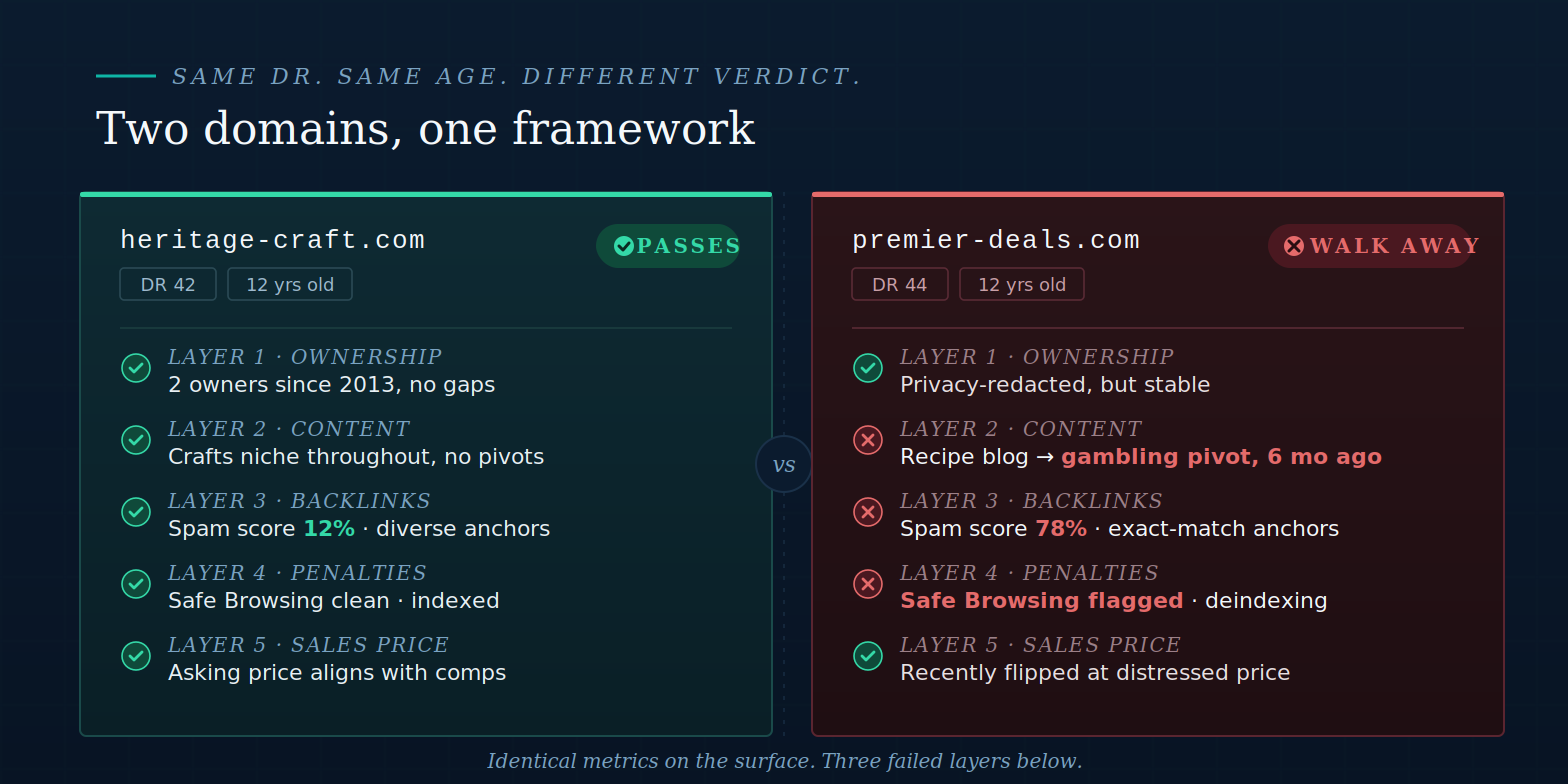
What you are looking for: multiple ownership changes within 12 months (signal: domain was flipped quickly), long gaps with no registrant (signal: domain dropped and re-caught), or a recent re-registration after a long dormant period (potential redirect-abuse window). Privacy redaction since GDPR (2018) limits identity data on newer domains, but registration date and registrar changes remain visible.
Layer 2: Content history
Bishopi’s Domain Age Checker includes integrated Wayback Machine access. For deeper exploration, query web.archive.org directly. Pull snapshots across the domain’s history, especially at the ownership transition points you identified in Layer 1.
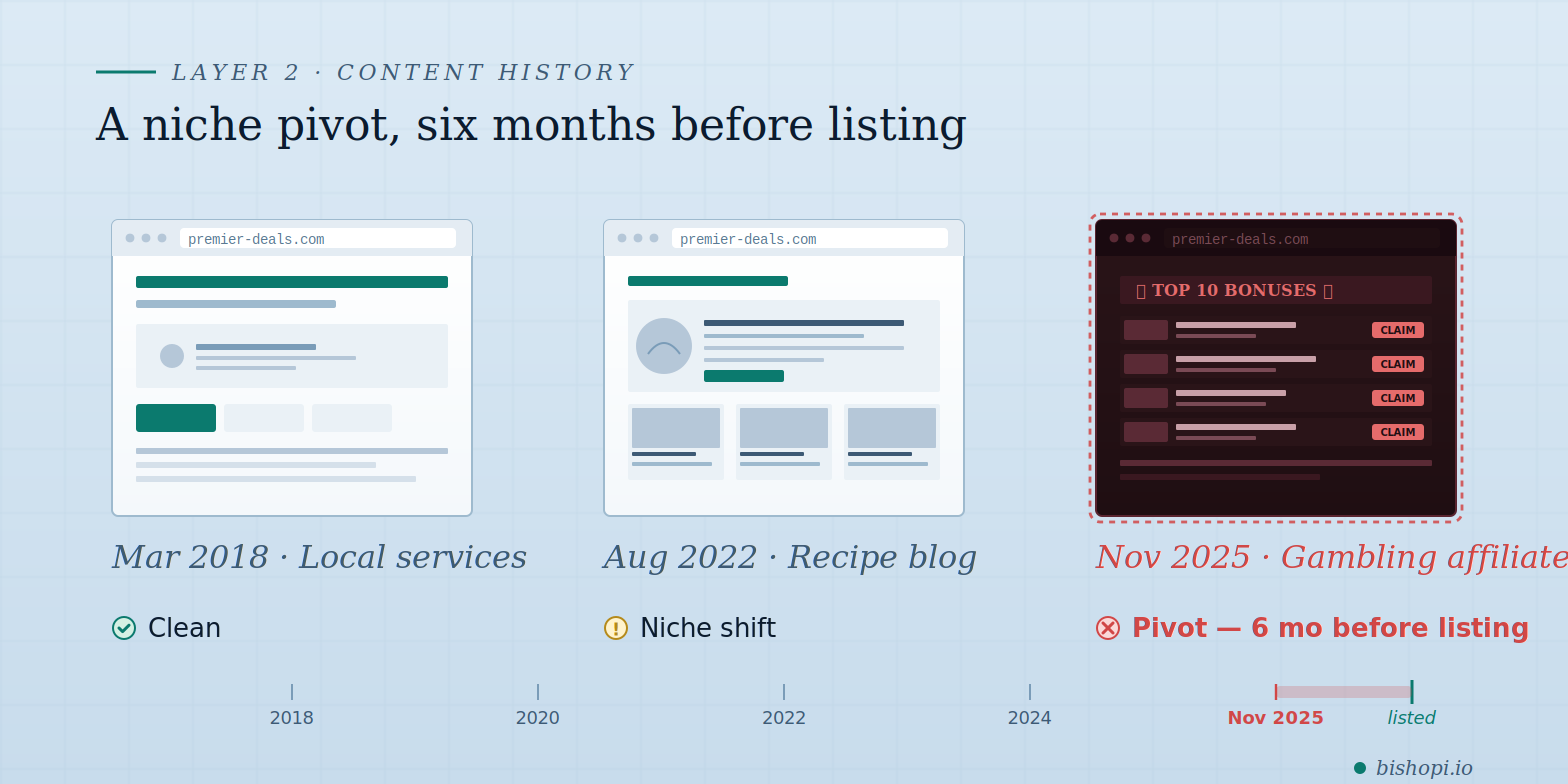
Three patterns to flag. First: a sudden niche change 6 to 12 months before the current listing (signal: domain was pivoted to manipulate incoming links into a new topic). Second: explicit content or regulated industries at any point in the history (adult, pharma, gambling, cryptocurrency scams). Third: near-empty placeholder sites across most of the history (signal: domain was parked, not developed, and the age does not carry the content authority you might assume). Where the Wayback Machine shows gaps with no snapshots, that often correlates with the ownership gaps from Layer 1.
Layer 3: Backlink and SEO history
Use Bishopi’s Domain SEO Analysis to pull the backlink profile, spam score, and authority metrics. Three signals matter most.
Referring domains versus total backlinks. A high total backlink count from very few referring domains points to a link scheme.
Spam score. Moz’s current scale is 0–100% (legacy 17-flag scale also still cited in some tools). Anything above 60% needs immediate investigation; 31–60% warrants caution.
Anchor text distribution. Exact-match commercial anchors at high percentages are a manual-action trigger.
For developers checking domains in bulk, the Domain Analysis API surfaces these signals programmatically. The historical backlink graph over time is one thing Bishopi does not show; for that layer, Ahrefs or Moz are necessary supplements.
Layer 4: Penalty and blacklist status
Three checks, in order of speed.
Google Safe Browsing. Go to transparencyreport.google.com/safe-browsing/search and enter the domain. A clean result is expected; anything flagged is an immediate disqualifier.
Spam score. From Bishopi’s Domain SEO Analysis. A high score combined with irrelevant backlinks signals algorithmic-penalty territory.
site: search. Run site:domain.com in Google. If the domain has documented content history but near-zero indexed results, Google has begun deindexing. Recovery is uncertain.
Inherited Google Search Console manual actions are not visible to a new owner pre-acquisition, which is why Layers 1 and 3 are the primary signals for penalty risk before a transaction.
Layer 5: Sales price history
If the domain has sold before, the transaction price and date are in Bishopi’s Domain Sales History (2M+ records aggregated from GoDaddy, Sedo, Afternic, NameJet, and others). This layer answers two questions: has the domain changed hands recently at a price significantly different from the current asking price (a red flag for artificial inflation or a distressed sale), and what is the comparable market value for similar domains.
Pair with Domain Value Analysis to benchmark the asking price against algorithmically-estimated value. NameBio is a complementary resource for sales records not in Bishopi’s database. If the domain has no recorded sales history, that is not a negative signal: many valuable domains have never been publicly traded.
Red Flags: What to Walk Away From
Five signals in practitioner order of severity. Any one of these is enough to pass on the domain.
Active Google Safe Browsing flag. Walk away. The domain is currently distributing malicious content. Even after cleanup, Safe Browsing recovery is 30 to 90 days minimum.
Multiple ownership changes in the last 12 months with content niche pivots. The domain was being cycled for redirect manipulation. The incoming links sit in mismatched contexts and will not transfer value cleanly.
Spam score above 60% (Moz scale) or strong equivalent in Bishopi’s scoring. The backlink profile has been significantly manipulated. Disavow work is 3 to 6 months minimum.
Near-zero Google indexation despite documented content history. Google has already started deindexing. The domain is starting from a deficit, not zero.
Asking price 3x or more above comparable sales with no clear explanation. Verify comparables in Domain Sales History. Inflated asking prices are common in the aftermarket.
If the domain passes all five layers and you decide to buy, see how to transfer a domain without losing SEO for the post-purchase migration steps.
Frequently Asked Questions
How do I check the history of a domain?
Domain history has five layers: ownership records (WHOIS Lookup + WhoisFreaks for the full timeline), content history (Wayback Machine), backlink and SEO history (Domain SEO Analysis), penalty status (Google Safe Browsing + site: search), and sales price history (Domain Sales History or NameBio). A thorough check takes 15 to 20 minutes.
Can I see who previously owned a domain?
Yes, with the right tools. Bishopi’s WHOIS Lookup shows current registrant data. For the full ownership timeline, WhoisFreaks offers free manual lookups. GDPR redaction since 2018 has masked registrant identities for many newer domains, but registration dates and registrar changes remain visible.
Does a domain’s history affect SEO?
Yes, in two ways. Google penalties from previous owners do not reset with ownership change, so a domain with an active manual action requires cleanup before it can rank. The backlink profile also transfers: high-quality topical links are an asset, spammy ones a liability that may need months of disavow work. Domain age alone is not a Google ranking factor, but the history built during that age often is.
What is a WHOIS history lookup?
A WHOIS history lookup retrieves the complete ownership transfer timeline for a domain: every registered owner, registrar, and nameserver change since first creation. Standard WHOIS tools (including Bishopi’s) show only the current registrant. For history, use a dedicated tool such as WhoisFreaks or DomainTools, which maintain archived snapshots over time.
How do I check if a domain has a Google penalty?
Three steps. Check Google Safe Browsing first; an active flag is an immediate disqualifier. Run a site:domain.com search; near-zero indexed pages on a domain with content history signals algorithmic deindexing. Then check the spam score and anchor patterns in Domain SEO Analysis.
How much does a domain history check cost?
Most of it is free. Google Safe Browsing, the Wayback Machine, WhoisFreaks manual lookups, and Bishopi’s WHOIS Lookup, Domain Age Checker, and Domain SEO Analysis are free to start. Domain Sales History is part of paid plans. A thorough pre-purchase check typically costs under $50 for a single acquisition.
Run All Five Layers Before You Buy
A 15-minute check saves a 6-month penalty cleanup. Start with WHOIS Lookup and Domain Age Checker for ownership and content history. Use Domain Sales History to benchmark the asking price. Free to start.
Originally published at: bishopi.io
Stay up to date
Get updated with all the news, update and upcoming features.