How to Build an AI Mode SEO Rank Tracking Software Using an SEO API
The most valuable position in Google isn't always position one anymore.
The first organic result now loses an average of 34.5% of its click-through rate when an AI Overview appears.Yet if you open most rank trackers, everything still looks normal.
Position one is still position one. What's changed is where people get their answer.
A lot of users directly get AI-generated answers even before they see organic results in the SERPs. Often, it answers their question without requiring another click.
When your content is cited, you stay part of that journey even without the top ranking. But if it isn't, stable rankings can still translate into fewer clicks.
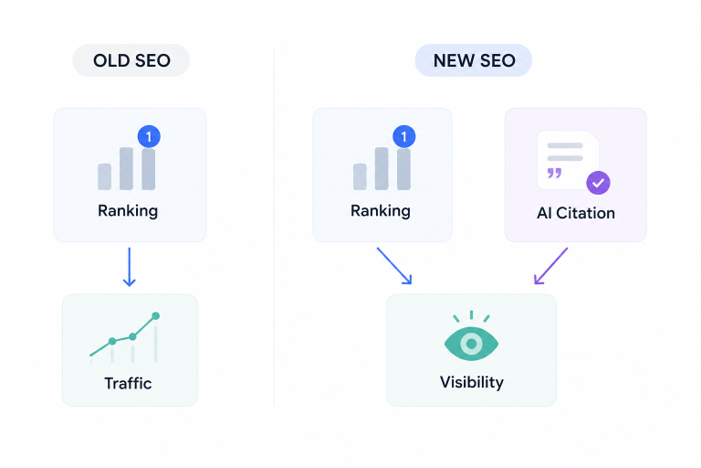
That's the disconnect. Google has stacked AI Mode and AI Overviews on top of the traditional results page, but most ranking reports haven't caught up. They tell you where your page ranks. They don't tell you whether Google generated an answer, which pages it cited, or whether your brand showed up at all.
This guide builds a free AI rank tracking system using the Bishopi SEO API — built to catch what standard rank trackers miss: AI Mode detection, citation visibility, and alerts when those signals shift.
It also draws a hard line between what's measurable today and what Google's APIs don't expose yet, so you end up with a tracker that's technically honest, not just technically impressive.
What's the Difference Between AI Mode, AI Overviews, and the SERP You Grew Up Tracking?
If you've started looking at AI search, you've probably noticed the terminology gets messy fast. AI Mode, AI Overviews, and the standard SERP are often treated as the same thing. They're not, and mixing them together makes SEO reporting much less useful.
The easiest way to think about them is as three different search experiences.
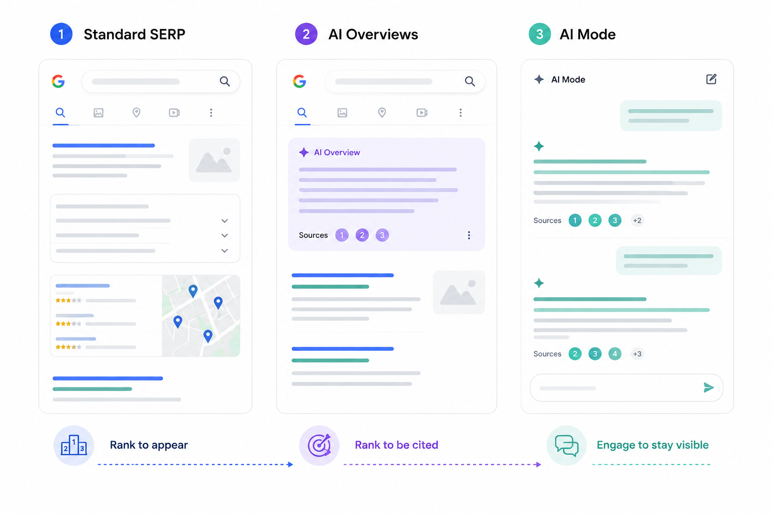
→ The standard SERP: This is the one you've been measuring for years. Rankings, Featured Snippets, People Also Ask, local packs, images, and videos. Traditional rank trackers were built for this world.
→ AI Overviews: It still lives inside that results page, but they change where attention goes. Google generates a summary before the organic listings and cites a handful of sources. Ranking first still matters, but so does becoming one of those citations.
→ AI Mode: Instead of generating a summary above the results, Google turns the answer itself into the search experience. Users ask follow-up questions, Gemini rewrites its response, and the sources it cites can change throughout the conversation.
That's why a single "AI visibility" metric doesn't tell you very much.
You're really measuring three different things:
Standard SERP: Where does my page rank?
AI Overviews: Does Google cite my content in the summary?
AI Mode: Does Gemini consistently use my content as part of the conversation?
Each one needs a different capture method, and that's the whole reason a generic ai mode seo rank tracking software plug-in usually disappoints people.
Field | AI Overviews | AI Mode | Standard SERP |
Where it appears | Inline, standard search results | Separate tab, dedicated experience | Standard results page |
Launched | May 2024 | May 2025 | N/A |
Trackability | Good — SERP APIs detect presence reliably | Partial — coverage varies by query and location | Excellent — mature tooling |
Citation structure | Source carousel below the summary | Inline citations within the response | Not applicable |
API support | Widely supported | Limited, improving | Universal |
SEO impact | High on informational queries | High but harder to quantify | Baseline, still foundational |
AI Mode SEO tracking means monitoring whether your domain is cited as a source when Google's Gemini-powered AI Mode responds to a query in your target keyword set, distinct from tracking standard rankings or AI Overview appearances.
Most ai mode seo tracking tools on the market today only check for presence — they don't separate our-citation from competitor-citation, which is the distinction that actually drives decisions.
The gap between these two products also isn't evenly distributed across industries, which matters when you're deciding where to point a tracker first.
BrightEdge's twelve-month comparison through February 2026 found:
B2B technology: AI-generated results increased from 36% of queries to 82%.
Healthcare: AI-generated results reached 88% of queries.
Restaurants: AI-generated results jumped from 10% to 78% in under a year.
If your keyword set sits in one of those categories, presence tracking alone will already show you a steep curve. Early 2026 data also suggests AI Mode compounds the effect, with click-through dropping even further than standard AI Overviews already cost you. That's the gap this article is built to close.
(For the AI Overview side of this, including Featured Snippets, People Also Ask, and inline summaries in standard search, see our developer guide to tracking SERP features. This article picks up where that one stops.)
What Does AI Mode SEO Rank Tracking Software Actually Return?
Before building anything, understand the data you're building against. A traditional rank tracker answers one question: where did my page rank?
An AI Mode tracker answers several more:
Did Google generate an AI response?
Was my domain cited?
Which competitors were cited instead?
What type of query triggered the response?
How did those signals change over time?
That difference shows up directly in the API response. For a standard query, the Bishopi SEO API returns:
Organic results (position, title, URL, snippet)
AI Overview presence (true/false) and cited URLs
SERP features (Featured Snippet, People Also Ask, Knowledge Panel, and more)
Query metadata (location, device, language)
A standard query with an AI Overview looks like this:
{
"query": "best project management software",
"organic_results": [
{ "position": 1, "title": "...", "url": "..." }
],
"ai_overview": {
"present": true,
"cited_urls": [
"https://example.com/page-1",
"https://example.com/page-2"
]
},
"serp_features": [
"featured_snippet",
"people_also_ask"
]
}
AI Mode returns a different response because you're measuring a different search experience.
```
{
"query": "how does project management software handle remote teams",
"ai_mode": {
"present": true,
"response_excerpt": "...",
"citations": [
"https://example.com/remote-guide"
],
"query_type": "conversational"
},
"organic_results": [
{ "position": 1, "title": "...", "url": "..." }
]
}
```
Notice what changed. Rankings are still there, but they're no longer the whole story.
The response now includes whether AI Mode appeared, what Gemini generated, which sources it cited, and the type of search that triggered it. Those are the signals your tracker will monitor.
One caveat before you build against this schema: AI Mode coverage isn't universal. As of mid-2026, availability still varies by location, language, rollout stage, and query type. Some searches return complete AI Mode metadata. Others don't trigger it at all.
I wouldn't hide that limitation — it reflects how Google's infrastructure actually works right now. A reliable tracker records the signals Google exposes and leaves the rest marked as missing. Filling gaps with assumptions just makes the data less trustworthy than no data at all.
The API response also tells you what happened, not why it happened. That's where outside signals become valuable.
A 2025 analysis of 129,000 domains found that referring domains were one of the strongest predictors of AI citations. In a separate study, 70% of cited pages had been refreshed within the previous 12 months, while pages that were not refreshed were more likely to lose rankings.
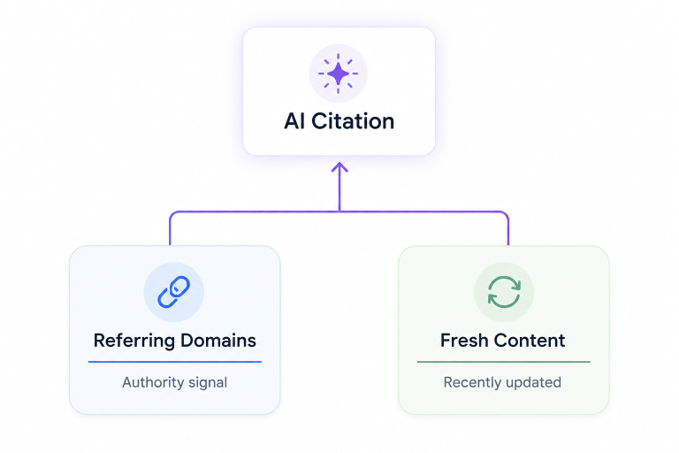
When you combine those signals with AI Mode presence and citation data, a simple response object becomes a useful diagnostic instead of another ranking report.
Explore the full Bishopi SEO API response schema to see every field available and how coverage varies across different query types.
What Should This Tracker Actually Be Built to Catch?
Before touching an API call, decide what you're optimizing for. I've seen teams build elaborate dashboards that answer a question nobody asked.
There are three objectives worth tracking, and only three:
Presence — is an AI Overview or AI Mode response appearing at all for this query?
Our citation — is our domain named as a source?
Competitor citation — which competitor domains are showing up instead, and how often?
Once you've decided what to track, the architecture largely writes itself: a keyword manager, a scheduled API caller, a parser that extracts AI Overview presence and cited URLs, and an alert layer that reports meaningful changes between runs.
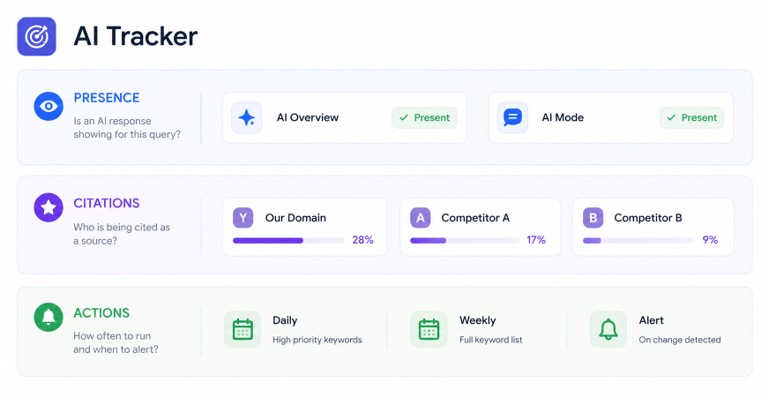
Run your highest-priority keywords daily and your full keyword set weekly. Reserve monthly trend reports for queries where AI Mode visibility fluctuates, because those shifts are worth monitoring.
It's the same principle used to monitor a domain portfolio. You don't check every domain's WHOIS record on the same schedule. You prioritize based on value and risk.
Your keywords should work the same way. A query where your domain is consistently cited can be checked less often. A query where a competitor appears for the first time should trigger an alert.
Treating every keyword the same creates more data, not more insight. Building that prioritization into your scheduler helps you catch the changes that actually matter.
How Do You Build AI Mode SEO Analysis Software, Step by Step?
This is the part that actually matters, so I'll walk you through it, step-by-step.
Step 1 — Set up API access. Authenticate, check your rate limits, and start on the Bishopi SEO API's free tier — it's enough to test this architecture against a small keyword set before you commit to a paid plan.
Step 2 — Define your keyword set. Informational and conversational queries trigger AI Mode far more often than transactional ones. Weight your list accordingly, or you'll spend a month wondering why your tracker shows nothing.
Step 3 — Make the call. A clean request needs an endpoint, an auth header, and three required parameters — query, location, device — plus optional ones for language, result count, and an include_ai_overview flag.
Parameter | Required | Purpose |
query | Yes | The exact keyword you're tracking |
location | Yes | Determines which regional SERP is served |
device | Yes | Desktop and mobile trigger AI features at different rates |
language | No | Needed for multi-market tracking |
num_results | No | Standard organic results to return alongside AI data |
include_ai_overview | No | Forces AI Overview fields into the response when present |
A note on rate limits, because I've seen this trip up more builds than any code error: don't call the API once per keyword per run without batching.
Group your keyword list, respect the documented calls-per-minute ceiling, and stagger your daily tier against your weekly tier so they don't compete for the same quota window. This matters more once your list grows past a few hundred terms.
Step 4 — Parse the response. Pull ai_overview.present, ai_overview.cited_urls, ai_mode.present, ai_mode.citations, and the standard organic_results block. That's the whole dataset you need.
Step 5 — Score each keyword. Is our domain cited, and at what position in the citation list? Which competitors are cited, and how often? Is AI Overview presence trending up or down?
Step 6 — Store results with a timestamp. The minimum viable record:
{ query, date, ai_overview_present, our_domain_cited, competitor_citations[], organic_position }
Step 7 — Build the alert layer. Flag new AI Overview appearances, citations gained or lost, and any competitor showing up for the first time.
Here's the full loop as pseudocode — a working skeleton beats three paragraphs describing one:
for keyword in keyword_list:
response = call_bishopi_api(keyword, location, device)
parsed = parse_response(response)
score = evaluate(parsed, our_domain)
store(keyword, date, score)
if score.changed_since_last_run():
send_alert(keyword, score)
That loop, running on a schedule against the Bishopi SEO API, is the entire product. Everything past this is refinement — better scoring logic, tighter alert thresholds, a cleaner dashboard. The core mechanism doesn't change.
How Can You Track AI Citations?
A single rank number stopped being the whole story the day AI Overviews rolled out. Being cited is the new version of ranking first, and it deserves its own metric.
Citation means your URL shows up in the AI Overview's source carousel — thumbnail, title, and link included. What earns that spot is fairly consistent: content that matches the query directly, clean structured data, and factual claims stated plainly enough for a model to lift them with confidence.
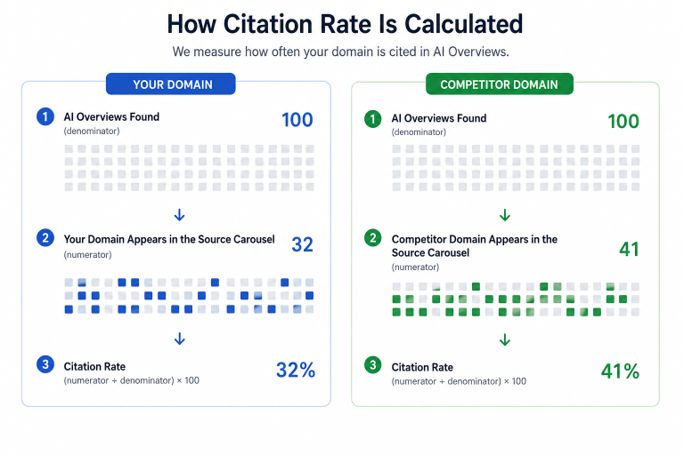
Track your citation rate with a simple formula:
Citation rate = (queries where you're cited ÷ total queries with an AI Overview) × 100
Run the same formula against a competitor's domain and you have a real comparison, not a guess. A citation frequency table by topic cluster tells you more than any single rank number ever will:
Illustrative example — not live data.
Topic Cluster | AI Overview Queries | Your Citations | Citation Rate |
Product comparisons | 42 | 11 | 26% |
How-to guides | 58 | 31 | 53% |
Pricing questions | 19 | 4 | 21% |
When a competitor is cited and you're not, don't guess. Pull their cited page, check its structure against yours, and look for factual depth or structured data you're missing. Track AI Overview citations across your keyword set with Bishopi and you'll see this gap before a client asks you about it.
Put a dollar figure on it before you present this to anyone who controls the budget.
Research found brands cited inside an AI Overview earn 35% higher organic CTR and 91% higher paid CTR than brands left out entirely.
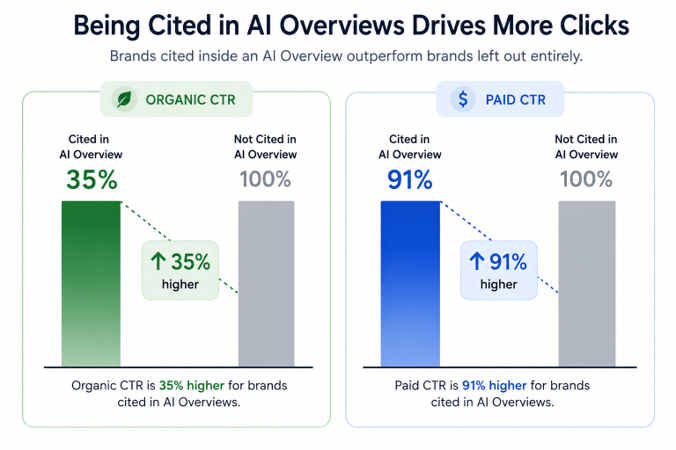
I'd rather walk into a budget conversation with a citation rate trend line than a rank position screenshot, because the trend line explains the CTR shift the rank position can't.
It's also worth setting expectations honestly at the client or stakeholder level. A 2025 five-state analysis of over 141,000 AI Overviews found roughly 43% of responses included at least one link the reader could act on — meaning more than half didn't, regardless of who was cited. Citation isn't guaranteed traffic even when you win it.
Track the citation rate as your leading indicator, and keep organic CTR as your lagging one, so you're not surprised when the two move at different speeds.
This is the same reporting shift I've watched agencies managing dozens of client accounts make over the past year — a single rank number stopped satisfying anyone the moment a client asked "but are we actually cited?"
Bishopi's AI Visibility Tracker (coming soon!) is being built specifically to answer that question at scale, across a full client roster, without someone manually checking each keyword.
Extending the Tracker: What Do You Monitor Next?
Once the tracker is running reliably, the next step is adding context. That's what turns a stream of API responses into a full AI Overview SEO rank tracking tool instead of a single-purpose script.
I'd extend the tracker in this order:
Keep organic rankings alongside AI visibility: Never look at AI Mode in isolation. A lost citation means something very different when your page also dropped from position three to eight than when rankings stayed exactly the same.
Track SERP volatility: Some queries trigger AI Mode consistently. Others flip between AI Mode and a traditional results page from one crawl to the next. Those unstable queries are often where the biggest visibility shifts happen first.
Classify query intent: AI Mode appears much more often for informational and navigational searches than transactional ones. Tagging intent makes it easier to spot where AI search is reshaping your keyword portfolio instead of treating every query the same.
Monitor visibility overlap: Track when your content earns both a Featured Snippet and an AI Overview citation for the same keyword. Those opportunities don't appear often, but when they do, they put your content in front of users multiple times before the first organic listing.
None of these signals replaces rank tracking. Together, they explain why rankings, citations, and traffic move the way they do.
Bishopi's SERP Analysis tool covers the organic ranking, SERP feature, and competitor tracking side of that workflow. Pair it with AI Visibility Checker to monitor AI citations alongside traditional search visibility.
FAQs
1. What is Google AI Mode, and how is it different from an AI Overview?
AI Overviews are AI-generated summaries that appear within Google's standard search results. AI Mode is a separate Gemini-powered search experience designed for conversational, multi-step queries. They look similar but expose different data, require different measurement methods, and shouldn't be treated as the same SEO surface.
2. Can a standard rank tracker measure AI Mode visibility?
Not completely. Most rank trackers report where a page ranks in the organic results. AI Mode introduces additional signals, such as whether an AI response appeared, which sources Gemini cited, and how those citations change over time. Measuring those requires AI-specific data alongside traditional rankings.
3. What does it mean when Google cites your content in an AI Overview?
It means Google selected your page as a supporting source for its AI-generated answer. A citation increases your visibility above the organic results and may drive brand exposure even when users don't click through to your site. Over time, tracking which pages earn citations can reveal the topics Google consistently trusts.
4. Is there a free way to start tracking AI Mode?
Yes — Bishopi's free API tier allows you to test the tracker architecture in this article against a small keyword set before you scale.
5. How often should I check AI Mode visibility?
Weekly is sufficient for most sites. If you publish frequently or compete in industries where AI search is evolving rapidly, such as technology or healthcare, daily monitoring can help you identify citation changes before they affect traffic trends.
6. What kind of content actually gets cited?
Google tends to cite pages that answer a query clearly, demonstrate topical authority, and are supported by strong backlink profiles. Independent studies also suggest that regularly updated content and well-established domains are cited more frequently than outdated or thin pages.
7. Does AI Overview presence really vary that much by industry?
Yes, substantially. Some verticals, like restaurants and education, moved from single-digit AI presence to well over 70% in under a year, while others moved far more slowly. Check your own vertical before assuming the cluster-wide averages apply to you.
Start Measuring What Google Actually Rewards
I still look at rankings. They're an important signal, but they're no longer enough on their own. Search now has another dimension to measure: AI visibility. That means knowing when an AI response appears, whether your content is cited, and whether those citations change over time.
That's why we track both. Rankings show where your pages appear in search results. AI visibility shows where your content appears in AI Overviews and AI Mode. Looking at both gives you a more complete picture of how your brand is being discovered.
→ If you're building your own reporting stack, start with the Bishopi SEO API — everything in this guide runs on it.
→ If you'd rather skip the build, wait for Bishopi’s AI Visibility Tracker (Coming soon!). It will run this exact loop for you — presence, citation, and competitor-citation tracking, scored and alerted, with nothing to maintain.
Originally published at: bishopi.io
Stay up to date
Get updated with all the news, update and upcoming features.