How to Monitor Brand Mentions via Google Scraping API in 4 Steps
Every time someone publishes an article, mentioning your brand, reviews, or compares your product with a competitor, or quotes your CEO, a signal is created somewhere in Google’s search results.
But catching those signals manually at scale is a difficult task, especially for SEO agencies and in-house teams managing brand presence across multiple markets.
Google Alerts misses important signals. Many Google search monitoring platforms become expensive as query volumes increase and often hide the underlying data behind proprietary dashboards.
A Google scraping API solves that scale problem. Instead of manually checking Google, you can collect structured SERP data and automate your brand monitoring workflow.
One API call can reveal organic mentions, knowledge panel visibility, People Also Ask questions, Google News coverage, and related searches. This guide shows how to build a complete brand monitoring workflow using a SERP scraping API to monitor brand mentions at scale.
By the end, you will have a framework for collecting, parsing, storing, and acting on Google search signals at scale.
What do Google Results Tell You About Your Brand?
Google search results reveal more than rankings. They expose how your brand is discussed, understood, questioned, and associated across Google’s ecosystem.
Organic results reveal third-party mentions and review content. Knowledge Panels reveal how Google understands your brand as an entity.
People Also Ask questions reveal customer concerns and curiosity. Google News surfaces media coverage. Meanwhile, Related searches expose associations between your brand and other concepts.
A SERP analysis tool like the one offered by Bishopi can give you a quick snapshot of a SERP's structure, but to monitor at scale and over time, you need the raw data.
Here are the five signal types worth tracking, and what each one actually means for your brand.
1. Organic Results
Organic results are often the most important signal. A comparison article ranking for your brand, a review site criticizing your product, or a forum thread discussing alternatives can influence perception more than your homepage.
Example:
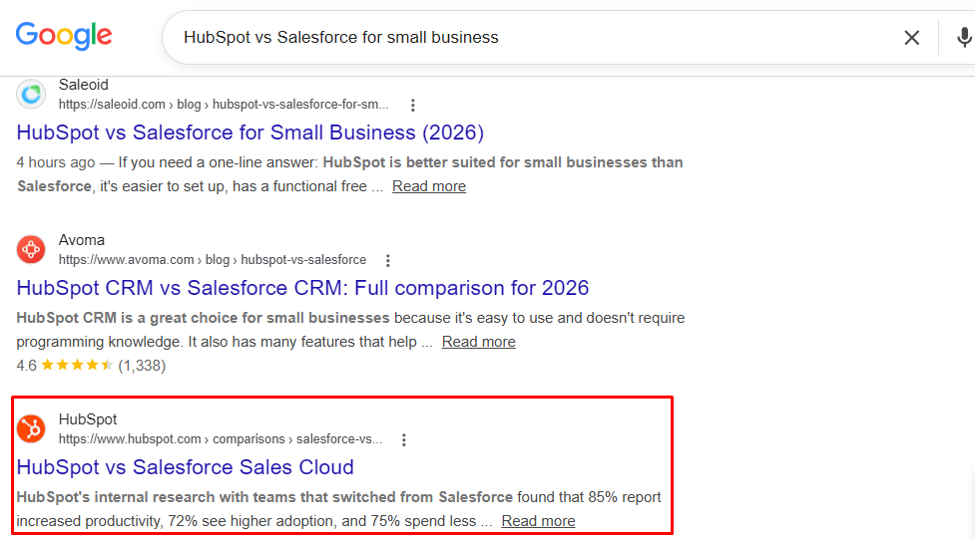
(A HubSpot comparison article ranking on Google’s page 1 for “HubSpot vs Salesforce for small business”)
These are the mentions that matter most for PR outreach and reputation response because they’re what your potential customers see before they ever reach your site.
2. Knowledge Panel
When Google recognizes a company, organization, person, or other subject as a distinct entity in its Knowledge Graph, it may display a Knowledge Panel.
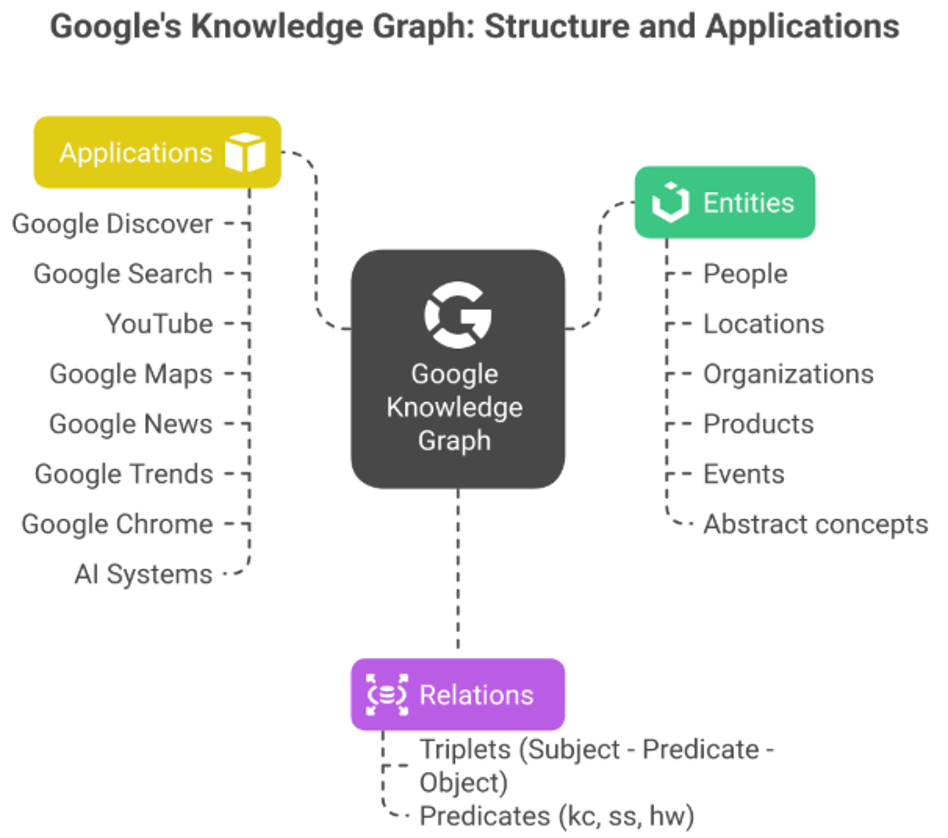
This is a card on the right side of the results page containing information such as logo, founding date, description, and related entities like this:
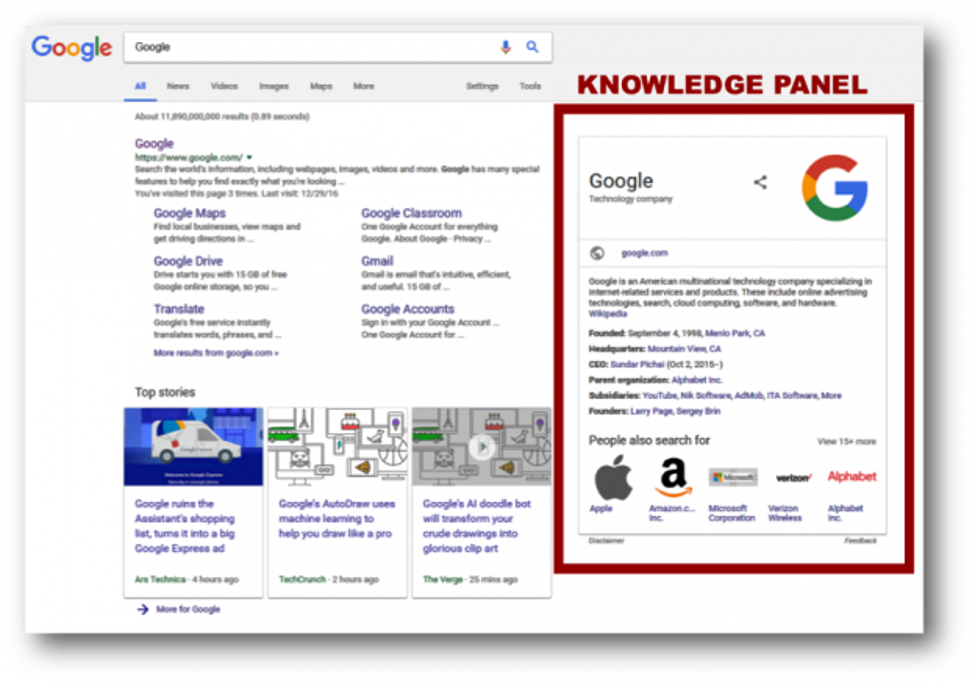
While Google has not stated that Knowledge Panels are a direct ranking factor, their presence indicates that Google has established an entity record for your brand and can confidently connect information about it across the web. This can strengthen brand visibility and reinforce trust signals for users.
Missing or changing information inside the panel can indicate opportunities to strengthen your entity footprint.
A SERP API returns the full knowledge_graph object in structured JSON, so you can monitor whether it appears, what it contains, and whether the description Google is pulling aligns with how you want to be represented.
3. People Also Ask
The PAA box surfaces questions users associate with your brand.
This is one of the most underused brand signals in SEO. A question like 'Is [Brand] legitimate?' or 'Why did [Brand] shut down?' appearing in PAA is an early warning sign of a narrative forming around your brand in search, or a content opportunity waiting to be taken.
Either way, you want to know the moment these questions appear for your brand queries, not three months later when the content ecosystem around them has already hardened.
4. Google News
Google News results surface recent media mentions and press coverage. New product launches, executive interviews, funding announcements, and industry commentary frequently appear here. Monitoring them allows you to identify opportunities for amplification, response, or outreach.
A SERP API returns each news result in news_results with a headline, source domain, and publication date, all parseable without visiting a single outlet.
This is especially useful when you’re managing a story that’s developing quickly, or when you want to track whether coverage is positive, neutral, or negative without relying on manual review.
5. Related Searches
The related searches block at the bottom of a Google results page reflects how Google clusters your brand with other concepts.
If your brand name co-occurs with competitor names, complaints, pricing concerns, or alternative products, that’s a reputation signal, one that tells you what associations Google (and by extension, searchers) is building around your brand. Related searches are easy to overlook, but worth monitoring for a brand’s online reputation.
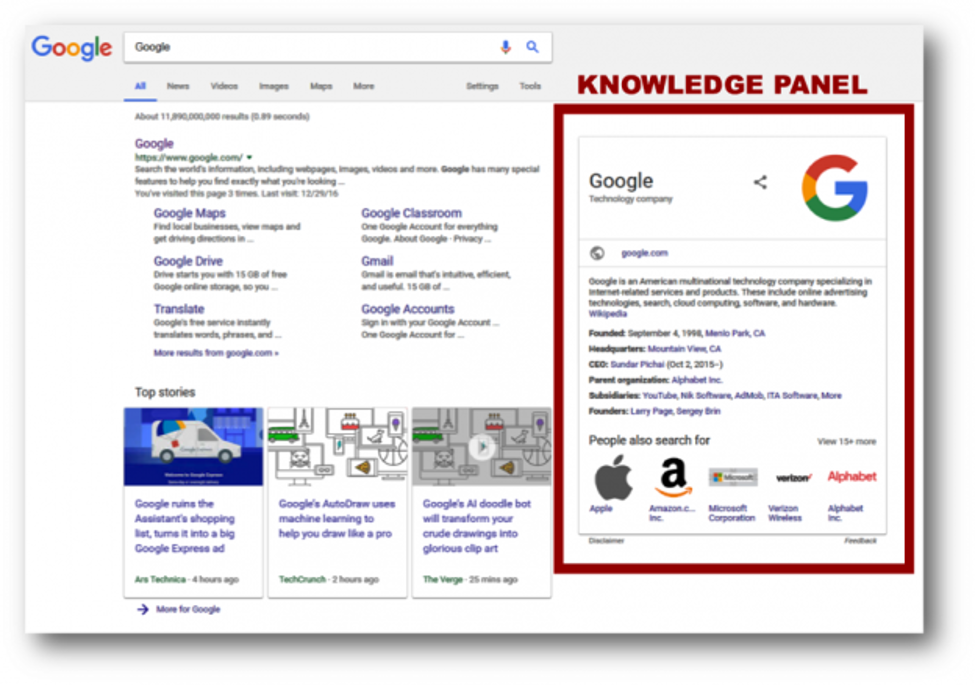
Here is an example of Bishopi’s SERP API response showing these signals.
AI-generated search experiences are making these signals even more important. AI Overviews now surface responses pulled from sources across the web and can include brand mentions in contexts you didn't author and can't directly control. This is an emerging signal that standard rank trackers miss.
You need to monitor the broader SERP to understand how users encounter your brand across Google's ecosystem.
Google's Official API vs a SERP Scraping API: Which One to Use?
The choice between Google Custom Search API and SERP scraping API depends on your goals. The Google Custom Search AP is useful for controlled search experiences but is not designed to provide a complete representation of Google’s public search results.
It includes usage limitations and does not expose every SERP feature that modern monitoring workflows depend on. For brand monitoring at scale, it's not well-suited to the job.
On the other hand, a SERP scraping API is designed for large-scale retrieval of search result data. Most solutions return structured JSON containing organic results, news results, related searches, People Also Ask data, and other SERP features.
This distinction becomes important when evaluating SerpApi alternatives. Rather than focusing solely on price, evaluate how much structured SERP data you actually receive.
For most SEO teams, a search API provides the foundation of broader workflows, including rank tracking, competitor analysis, share-of-SERP analysis, and brand monitoring.
If you're evaluating a SERP API alternative specifically for brand monitoring or rank tracking workflows, here's a brief comparison table of the Google Custom Search API and Third-Party SERP Scraping API to guide you:
Comparison criteria | Google Custom Search API | Third-Party SERP Scraping API |
|---|---|---|
Daily query limit | 100 queries/day (hard cap, free tier) | No hard cap. Pay per query, scales on demand |
Index scope | Only within your configured programmable search engine. Not the full Google index | Full Google results page, including organic, news, PAA, Knowledge Graph, and related searches |
Data returned | Structured metadata from a limited index. Limited SERP features | Complete structured JSON: organic_results, knowledge_graph, news_results, people_also_ask, related_searches |
If you're monitoring brand mentions across organic results, news, PAA, and Knowledge Panel, and especially if you're doing it across multiple locations and at any volume, I’d recommend using a third-party SERP API. The Google Custom Search API simply wasn't built for this.
Here is a Reddit complaint concerning Google’s API and why SEOs prefer to use third-party APIs:
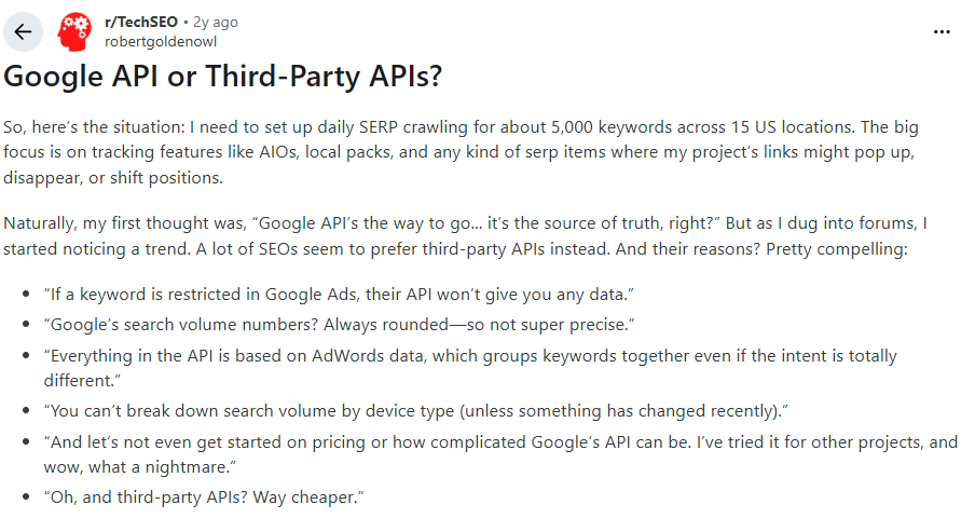
Meanwhile, the SerpApi is the category incumbent and well-known in this space. There are also a growing number of SerpApi alternatives worth evaluating, including Bishopi, Serper API and others. Bishopi in particular is purpose-built for SEO use cases and returns the same structured signal types at competitive per-query pricing.
How to Monitor Brand Mentions via Google Scraping API in 4 Steps
Here is how to build a system that monitors brand mentions using a Google Scraping API. No external SDK required.
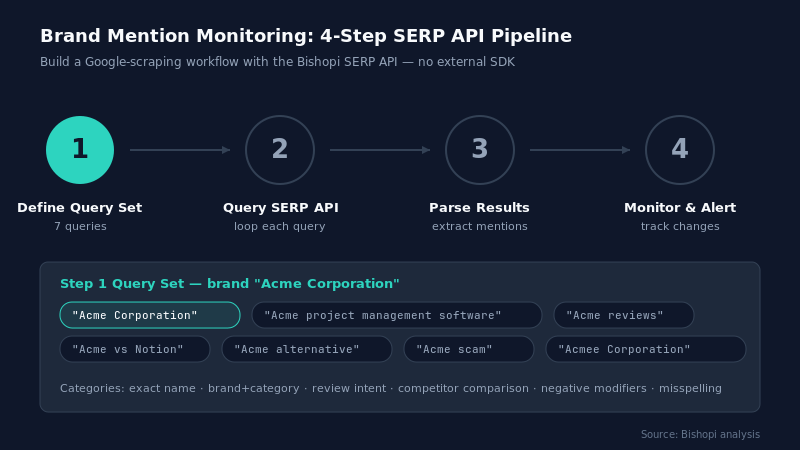
Step 1: Define Your Query Set
The queries you run determine what you catch and what you miss. A narrowly defined query set is one of the most common reasons brand monitoring workflows miss meaningful mentions.
Before writing a single line of code, define your query set.
For our example, we’ll use 'Acme Corporation' as our brand name.
For most brands, the query set should include at a minimum:
Exact brand name: 'Acme Corporation'
Brand + category: 'Acme project management software'
Brand + review intent: 'Acme reviews', 'Acme review 2026'
Brand + competitor comparison: 'Acme vs Notion', 'Acme alternative'
Common misspellings: however your brand name is most frequently mistaken
Brand + negative modifiers: 'Acme scam', 'Acme problems', 'Acme complaints'
Store these as a Python list. You'll loop through them in Step 2.
queries = [
"Acme Corporation",
"Acme project management software",
"Acme reviews",
"Acme vs Notion",
"Acme alternative",
"Acme scam",
"Acmee Corporation", # common misspelling
]
Step 2: Query the Bishopi SERP API
Once you have your query set, it's time to pull data. The Bishopi SERP API accepts a keyword, location, and device parameter and returns a structured JSON response for the full Google results page.
Here's a minimal working example using Python's requests library:
import requests
API_KEY = "your_bishopi_api_key"
BASE_URL = "https://api.bishopi.io/serp"
def query_serp(keyword, location="us", device="desktop"):
    params = {
        "api_key": API_KEY,
        "q": keyword,
        "gl": location,
        "num": 10,
    }
    try:
        response = requests.get(BASE_URL, params=params)
        response.raise_for_status()
        return response.json()
    except requests.exceptions.RequestException as e:
        print(f"API error for {keyword}: {e}")
        return None

The response object includes the following top-level keys: organic_results[], knowledge_graph{}, news_results[], people_also_ask[], and related_searches[]. Each is a separate brand signal. You'll parse each one in Step 3.
Example JSON Response:
 {   "organic_results": [...],   "knowledge_graph": {...},
  "news_results": [...],   "people_also_ask": [...],
  "related_searches": [...] }
Step 3: Parse Brand Signals from the Response
Raw search data is not useful until it becomes structured information. Build rules that classify mentions into categories such as PR, reputation, competitor activity, review content, or media coverage.
This function checks each section of the API response for your brand name and returns a structured list of signal objects, each tagged with its source, type, and content.
def parse_brand_signals(data, brand_name):
    signals = []
    brand = brand_name.lower()
    # Organic results
    for r in data.get("organic_results", []):
        if brand in r.get("snippet", "").lower() or brand in r.get("link", "").lower():
            signals.append({"type": "organic", "url": r["link"],
                "snippet": r.get("snippet", ""), "position": r.get("position")})
    # People Also Ask
    for q in data.get("people_also_ask", []):
        if brand in q.get("question", "").lower():
            signals.append({"type": "paa", "question": q["question"]})
    # News results
    for n in data.get("news_results", []):
        if brand in n.get("title", "").lower():
            signals.append({"type": "news", "title": n["title"],
                "source": n.get("source"), "date": n.get("date")})
    # Related searches (negative co-occurrence check)
    neg_terms = ["scam", "problem", "complaint", "alternative", "bad"]
    for rs in data.get("related_searches", []):
        query_text = rs.get("query", "").lower()
        if brand in query_text and any(n in query_text for n in neg_terms):
            signals.append({"type": "related_negative", "query": rs["query"]})
    return signals
Step 4: Store Results and Trigger Alerts
Parsing signals in real time is useful for a one-off audit. For ongoing monitoring, you need somewhere to store what you found and a comparison against the previous run so you can flag net-new mentions.
The example below appends results to a CSV and fires a Slack webhook when something new appears. Swap the CSV for a database like PostgreSQL or SQLite if you're running this at agency scale.
import csv, json, requests as req
from datetime import datetime
SLACK_WEBHOOK = "https://hooks.slack.com/services/YOUR/WEBHOOK"
def store_and_alert(signals, query, filepath="brand_signals.csv"):
    try:
        with open(filepath, "r") as f:
            existing = [row["snippet"] for row in csv.DictReader(f)]
    except FileNotFoundError:
        existing = []
    new_signals = [s for s in signals if str(s) not in existing]
    with open(filepath, "a", newline="") as f:
        writer = csv.DictWriter(f, fieldnames=["timestamp","query","type","url","snippet"])
        for s in new_signals:
            writer.writerow({"timestamp": datetime.now().isoformat(),
                             "query": query, **s})            req.post(SLACK_WEBHOOK, json={"text": f"New {s['type']} signal for '{query}': {s}"})
Add a loop across all your queries, and you have a working monitor. Run it on a schedule. Daily for most brands, hourly for crisis situations, using cron or any task scheduler.
How do You Scale Brand Monitoring Across Locations and Devices?
A single-location query set is fine for brands operating in one market. For global brands or agencies managing clients across multiple geographies, brand signals vary significantly by location.
For instance, a Knowledge Panel that appears in the US may not appear in the UK. News results for your brand in Germany may cover an entirely different story than what's surfacing in Australia. Related searches reflect regional search behavior and can differ dramatically.
Parameterize location and device in your API calls and loop over a list of target markets.
targets = [
    {"location": "us", "device": "desktop"},
    {"location": "gb", "device": "desktop"},
    {"location": "de", "device": "mobile"},
    {"location": "au", "device": "desktop"},
    {"location": "ca", "device": "mobile"},
]
all_signals = []
for q in queries:
    for t in targets:
        data = query_serp(q, location=t["location"], device=t["device"])
        signals = parse_brand_signals(data, "Acme")        all_signals.extend(signals)
Separate mobile vs desktop. Knowledge Panel presence, PAA box frequency, and organic result composition can differ between devices, particularly for local-intent queries.
For agencies managing multiple clients, add a client_id key to every signal you store. Run the full workflow per client, each with its own query set and target locations, and filter your stored data by client when reporting.
This also makes it easy to extend the monitor to include rank tracking without duplicating your infrastructure.
How Do You Act on Brand Mention Data?
Data that doesn't drive action is useless. Here are three ways to act on brand mention data.
1. PR Outreach
Every time your monitor surfaces a new organic mention from a domain where you don't have a backlink, that's an outreach opportunity. If a journalist or blogger wrote about your brand favorably, linked to you, and the page ranks organically, you probably already knew about it.
If they wrote about you without linking, or if a comparison article mentions you in context without attribution, your monitor just handed you a warm outreach target.
Cross-reference new organic signals against your existing link profile. Anything that mentions you by name in a snippet, comes from a domain with authority, and doesn't have a link pointing to you is worth a polite email.
If your monitor surfaces an article comparing competitors in your category that doesn't mention you at all, that's editorial coverage you should be in.
2. Reputation Management
The People Also Ask box is one of the earliest warning systems you have for negative sentiment forming around your brand.
If 'Is [Brand] a scam?' or 'What happened to [Brand]?' appears in PAA for a brand query, that question is surfacing because enough people are searching it. Do not wait for the question to rank for a standalone keyword before you respond.
Your monitor catches it as soon as it appears in the PAA block. That gives you time to create content that addresses the question and to optimize it fast enough to be the answer Google pulls into the box rather than a third-party source that frames the question unfavorably.
Related searches with negative modifiers ('brand + scam', 'brand + complaints') work the same way. They're not crises yet. They're early signals that a narrative is starting to form, and catching them early gives you options that you lose once the content ecosystem around that sentiment matures.
3. Competitive SERP Share
Traditional rank tracking tells you where your pages rank for a given keyword. What it doesn't tell you is how much of a results page your brand occupies relative to competitors for category-level queries.
That's share-of-SERP, and for branded category queries, it's often a more meaningful competitive metric than position alone.
Run your monitor against brand + category queries and count how many of the top-10 organic results mention your brand versus competitors. Track this weekly.
A shift in that ratio, for instance, your brand appearing in fewer results while a competitor's mentions climb is a strategic signal worth investigating, and it shows up in SERP data well before it shows up in market share.
A competitor analysis tool can complement this view at the domain level, but the real value of the API-driven approach is the ability to track SERP composition over time, across queries and locations, at a granularity that point-in-time tools can't match.
One more thing worth noting: if you want domain-level brand protection alongside SERP monitoring, like tracking trademark registrations, domain squatting attempts, or lookalike domains that could divert traffic, use a brand monitor tool like the one offered by Bishopi.
It's a complementary layer to what this workflow does, covering the domain ecosystem rather than the SERP one.
Start Monitoring Your Brand in Google
Brand presence in Google isn't static. A Knowledge Panel disappears. A PAA question with negative framing appears overnight. A competitor's review page climbs into position 3 for your brand name. A news story breaks, and results shift within hours. None of this is visible in a weekly rank report, but all of it is visible in the raw data that a Google scraping API returns on every query.
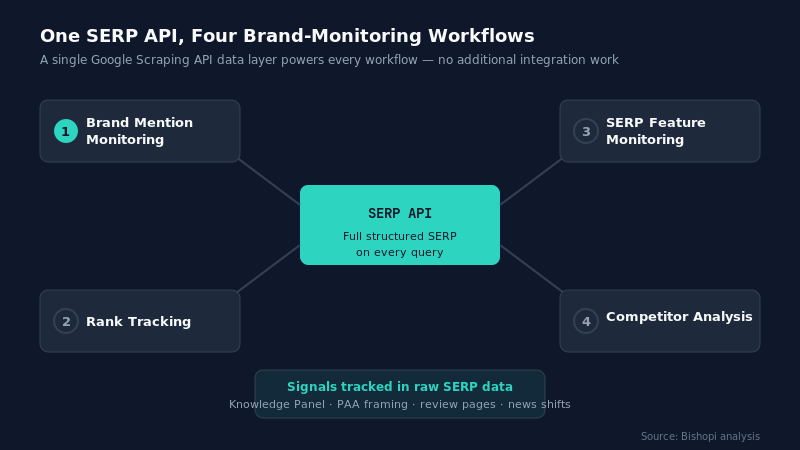
What we built through the workflow above is a monitoring system that scales with you. The same SERP API that powers this brand monitor also supports rank tracking, SERP feature monitoring, and competitor analysis without any additional integration work. You're building on a data layer that can serve multiple workflows, not a one-off script.
Ready to pull your first brand signal on Google? Try Bishopi's SERP API — it returns the full structured SERP you need for this workflow and is built for exactly this kind of programmatic brand monitoring.
For domain-level brand protection running alongside your SERP monitor, use a domain brand monitor tool. It covers trademark registrations, lookalike domains, and domain squatting alerts in one place.
FAQ
What is a Google scraping API?
A Google scraping API is a third-party service that retrieves structured data from Google search results pages and returns it as JSON.
Unlike Google’s own Custom Search API, which is limited to a configured index, a SERP scraping API returns the full public results page, including organic results, knowledge panels, People Also Ask, Google News, and related searches.
Is using a SERP scraping API legal?
Scraping publicly available search results sits in a legally grey area that varies by jurisdiction and terms of service. Most commercial SERP APIs handle compliance on their end by managing how queries are routed. Always review the terms of service of your chosen provider and consult legal counsel for high-volume or commercial use cases.
How is a Google scraping API different from Google Alerts?
Google Alerts monitors the web for new content matching a query and delivers email notifications, but it does not return structured data, misses many mentions, and provides no SERP feature context.
A SERP scraping API returns the full search result page in structured JSON, making it suitable for programmatic monitoring, storage, and trend analysis at scale.
Can I monitor brand mentions for free?
Google Alerts is free and catches some mentions. For structured, scalable monitoring with SERP feature data, such as Knowledge Panels, PAA, news results, and related searches, a commercial SERP API is required. Most providers offer a free tier or trial credits to get started before committing to a paid plan.
What’s the difference between rank tracking and brand monitoring?
Rank tracking measures where your own pages appear for target keywords. Brand monitoring tracks how your brand name appears across the full results page for queries that include your brand. Both use the same SERP API infrastructure but answer different questions.
Originally published at: bishopi.io
Stay up to date
Get updated with all the news, update and upcoming features.