Rank Tracker API: Scale Keyword Rank Tracking Easily
Tracking keyword rankings sounds simple until you’re doing it for 500+ keywords across multiple clients, domains, countries, and devices. You’ll definitely hit a wall, especially if you’re using dashboard-based SERP monitoring tools like Semrush.
These tools might work for a handful of keywords, but can quickly break when you need automation, flexibility, and scale.
They are also built for SEO managers who click through reports. Not for developers who need to pipe rank data into custom dashboards, automate client reporting, or build SEO products at scale.
The best rank tracker API can change everything.
Instead of clicking through dashboards, exporting CSVs manually, and stitching reports together, a SERP tracking API pulls ranking data programmatically. You control how rank data flows into your product, reporting pipeline, or internal dashboard.
In this guide, you’ll learn how a Google rank tracking API works architecturally, what parameters matter beyond raw position, why UI tools fail at scale, and how to implement API-based SERP monitoring in your stack.
Why Traditional SERP Trackers Fail at Scale
Roughly 58–60% of Google searches are zero-click. Users get answers directly on the search results page from AI Overviews, knowledge panels, or featured snippets, never clicking a website.
That means tracking visibility, not just rankings, requires structured, scalable data.
UI-based tools break once you move beyond small keyword sets. They limit exports, block automation, and charge per seat.
For instance, Ahrefs offers a Standard plan at $129 per user per month, but you’ll need to purchase additional seats at $60/mo each.
You can’t easily access historical data or pipe results into your own systems. For developers building SEO tools or agencies handling volume, this model can become inefficient fast.
Here’s why these tools fail:
Rate limits on data exports: Most UI rank tracker tools cap how often you can export rank data. You might get one export per day, or face hourly limits. When you're running SERP monitoring across hundreds of domains, that throttle can limit your pipeline.
No programmatic access to historical data: For some tools, you can view historical rank trends inside the dashboard, but you can’t pull that data into your own database. You’ll need a keyword rank checker API to automate delta tracking or build trend visualizations in your own stack.
Per-seat pricing that balloons for SEO agencies: Agency rank tracking software built on a per-seat model can get expensive fast, especially when multiple team members need access. API-based rank trackers, on the other hand, scale with usage, not headcount. You pay for what you query, not who's logged in.
No custom workflows: You can’t push data into your own dashboards or reporting systems. You’re locked into their UI. If you’re building tools or running daily rank tracking, this setup simply doesn’t hold. A SERP tracking API gives you raw data you can route anywhere, whether to your database, BI tools, Slack alerts, or whatever your stack needs.
How a SERP Tracking API Works
The best SERP tracking API lets you check keyword rankings programmatically. You send a request with a keyword, domain, location, language, and device like this:
{
  "keyword": "best running shoes 2026",
  "domain": "example.com",
  "location": "United States",
  "language": "en",
  "device": "desktop"
}
The API queries Google, fetches real-time SERP data, and returns structured data in JSON format, including the domain's position, the ranking URL, SERP features present, and search metadata like this:
{

  "status": "success",
  "ranking": {
    "position": 4,
    "url": "https://example.com/blog/best-running-shoes",
    "title": "Best Running Shoes of 2026 – Tested & Reviewed",
    "description": "We tested over 40 running shoes this year. Here are the top picks for road, trail, and track runners at every budget.",
    "position_change": +2,
    "previous_position": 6
  },
  "serp_features": {
    "featured_snippet": false,
    "people_also_ask": true,
    "shopping_ads": true,
    "local_pack": false,
    "image_pack": true,
    "video_results": false,
    "site_links": false,
    "knowledge_panel": false
  },

  "search_metadata": {
    "total_results": "412,000,000",
    "ads_top": 2,
    "ads_bottom": 1,
    "organic_results_count": 10,
    "search_engine": "google.com",
    "timestamp": "2026-11-14T09:32:00Z"
  }
}
This is what a Google rank tracking API or SEO rank checking API is built to do efficiently at scale.
How This Differs from a UI Rank Tracker
A UI tool runs rank checks on its own schedule and then displays the results in a dashboard. You have no control over when checks run, what format the data comes in, or where it goes.
A SERP rank API flips that. You trigger checks when you want them, and receive structured data in a format you can parse immediately.
You can then store the data wherever makes sense for your pipeline. What’s more? You can decide the frequency, the granularity, and the downstream destination.
In summary, a UI rank tracker uses a passive and display-only model. You can only view rankings.
On the other hand, a SERP rank tracker API uses an active and programmable model. You own the rankings data, can automate SERP monitoring, and build custom dashboards.
Key Parameters to Track with a SERP API (Beyond Position)
With today’s AI search landscape, position is the most visible metric, but it doesn’t tell the full story. A keyword ranking #3 on a SERP dominated by an AI Overview and two featured snippets may deliver fewer clicks than the same ranking on a clean SERP.
Research from Seer Interactive tracking 3,119 informational queries across 42 organizations found that organic CTR dropped from 1.76% to 0.61% for queries where AI Overviews were present, representing a 61% decline.
A good rank tracker API returns deeper insights that help you understand SEO performance in context.
Here are the parameters worth monitoring:
Ranking URL: Position tells you where you rank. The ranking URL tells you which page Google is surfacing. If it's not the page you optimized, you've got a cannibalization problem. This is a first-signal diagnostic you can only catch with URL-level data.
SERP features: A featured snippet, PAA box, local pack, or AI Overview appearing above position #1 can reduce your click-through rate, even if your ranking position didn't change. Track these alongside position.
Device type: Mobile and desktop SERPs return different rankings for the same keyword. Always specify device type in your API call since treating them as equivalent can lead to misleading reports, especially for clients whose audiences are predominantly mobile.
Location/Geo: A keyword ranking #3 nationally may rank #15 in a specific city. Local SERP tracking requires geo-level queries, not just country-level averages.
Search engine: Google dominates with approximately 90% search engine market share, but some clients operate in markets where other search engines matter. A solid SERP monitoring tool supports multi-engine tracking so you’re not flying blind in secondary markets.
Historical trends: A single position snapshot is a data point. A week of daily checks is a trend. Store every result with a timestamp so you can surface movement over time and tie ranking changes to specific algorithm updates or content changes.
How to Handle Bulk and Daily Rank Tracking at Scale via API
Tracking a few keywords is easy until you have thousands to track daily. You need a pattern for batching requests, scheduling checks, and storing results in a way that enables trend analysis, without hammering rate limits.
Here is how to perform bulk rank tracking with a rank tracker API:
Structure Batch Requests for Large Keyword Sets
For bulk SERP tracker workflows, chunk your keyword list into batches. If you send 500 requests simultaneously it will hit limits. Instead, process keywords in groups of 50 to 100 per batch with a short delay between batches, as shown in the example below:
keywords = ["seo api", "rank tracker api", "serp monitoring", "google rank tracking api", ...]
domain = "example.com"
results = []
for kw in keywords:

    result = bishopi_serp_api.check_rank(
        keyword=kw,
        domain=domain,
        location="us",
        device="desktop"
    )
    results.append({
        "keyword": kw,
        "position": result.position,
        "serp_features": result.serp_features,
        "checked_at": datetime.utcnow()
    })
    time.sleep(0.5)  # respect rate limits
This keeps your throughput steady without triggering throttling.
Schedule Daily Rank Tracking to Avoid Rate Limit Issues
Google makes thousands of ranking changes per year, so even small changes can shift rankings. You need to run daily rank tracking to capture fluctuations.
Daily rank tracking with API works best when you spread checks across a time window rather than running them all at midnight.
You can use a job scheduler such as Cron, Celery, or a cloud task queue to distribute requests evenly throughout the day.
If you're tracking 1,000 keywords daily across multiple clients, that's roughly 40 API calls per hour spread over 24 hours. Most APIs handle that comfortably.
Otherwise, batching everything into one window can lead to throttling and the risk of receiving cached or stale SERP data.
For high-priority keywords, such as competitive keywords you're actively building content around, run checks twice daily.
Storing and Comparing Results Over Time
Store SERP data results with a timestamp in a database. This gives you a time-series dataset you can compare to detect movement. Having a simple delta check can help you compare today's position against yesterday's.
Local and Mobile SERP Monitoring: Why Location Changes Everything
Ranking results vary significantly based on location and device. Besides, the same keyword returns different positions depending on where and how the user is searching.
Local and mobile tracking with a SERP tracking API allows you to retrieve rankings based on geographic location and device type.
The Location Tracking Parameter
Google personalizes results by location at the city level. A plumber ranking #3 in Chicago may not even appear in the top 20 for the same query in Boston.
When you run a local SERP tracking, always pass an explicit location parameter because country-level tracking gives you averages that don't reflect real user experience. For local SEO clients, you need city-level or even postcode-level granularity.
Mobile vs Desktop
Device type is a separate tracking dimension. A search query for 'best pizza near me' on mobile can return a dominant local pack at the top. The same query on a desktop device can show a mix of local results and editorial content.
If your site is optimized for mobile and you're only tracking desktop rankings, you're working with incomplete data. Track both. Pass device=mobile and device=desktop as separate calls for the same keyword set.
Competitor Rank Tracking via API
Competitor rank tracking with a rank tracker API involves querying the same keywords for different domains with different parameters. This enables comparison, gap analysis, and performance monitoring across competitors.
Run the same keyword list against three competitor domains. Store their positions alongside yours. Now you have a side-by-side view of how you're moving relative to the competition, not just how you're doing in isolation.
When a competitor gains ground on a keyword you're targeting, you want to know immediately, not when your SEO manager notices it three weeks later in a dashboard.
With daily rank tracking via API, you can build automated alerts that fire the moment a competitor crosses a threshold that matters: entering the top 3, capturing a featured snippet, or appearing in an AI Overview for the first time.
Consider a real-world scenario: an agency tracking 20 competitor domains across 500 keywords. That's 10,000 keyword-domain combinations per daily run. A UI tool can't handle that workflow, but a bulk SERP tracker built on API infrastructure can.
For deeper competitor intelligence, say SERP share, ranking URL changes, and organic visibility trends, tools like Bishopi competitor analysis pair naturally with the rank tracking API.
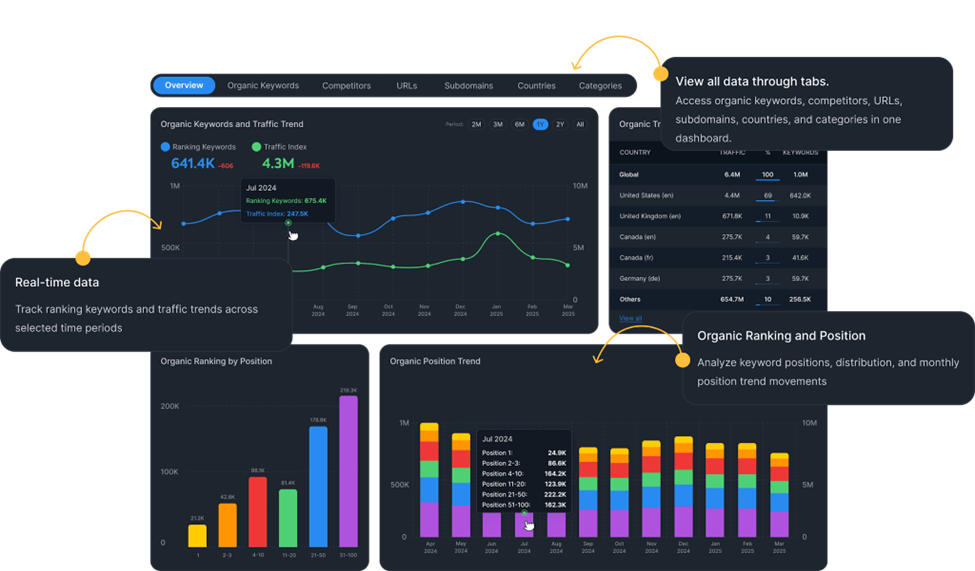
The tool can extend the same data layer without requiring a separate integration.
Using the Bishopi SERP API for Rank Tracking
For developers who need scalable rank tracking, a SERP API like the one offered by Bishopi lets you track rankings programmatically. Using the API, you can query SERP data in real time across multiple search engines, domains, devices, and geolocations, and get results in structured JSON responses you can plug directly into your SEO workflows.
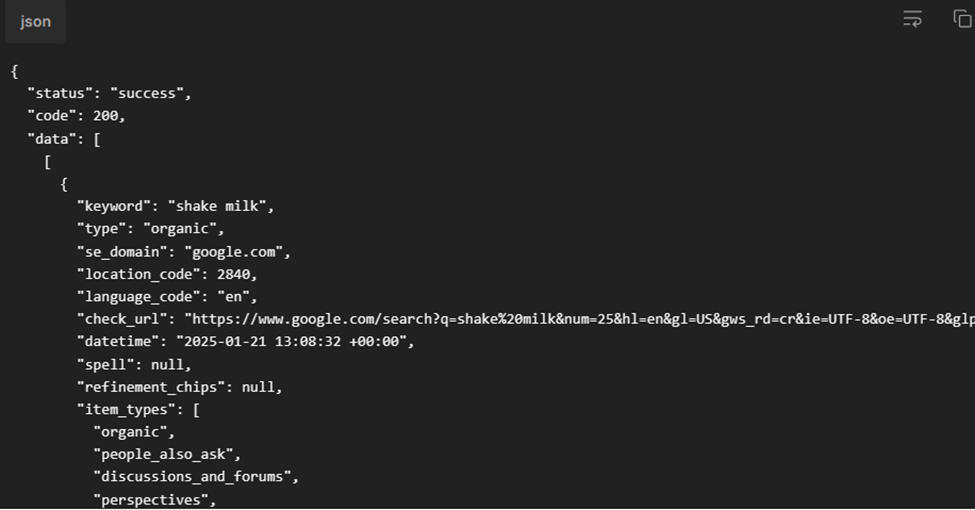
It works as a keyword ranking API that returns the domain's position in search results, the ranking URL, a list of SERP features detected (featured snippet, PAA, local pack, AI Overviews), the search engine used, and the query metadata.
Scale Keyword Tracking with a Rank Tracker API
UI tools had their moment. They still work for small-scale rank tracking.
But once you need automation, they become a limitation.
If you're tracking keywords at scale, you need programmatic access to SERP data. You need to schedule bulk checks, store time-series results, and build the reporting layer your clients actually need.
A rank tracker API doesn't replace your SEO strategy. It replaces the manual process that slows it down, giving you full control so you can decide how data flows, how it’s stored, and how it’s used.
Frequently Asked Questions
What is a SERP rank tracking API?
A SERP rank tracking API is a programmatic interface that lets you retrieve keyword rankings from search engines in real time.
You send a keyword, domain, and location, and the API returns structured SERP data including position, URL, and features. This enables automated SERP monitoring and large-scale tracking without manual checks or dashboards.
How is API-based rank tracking different from using a tool like Semrush or Ahrefs?
Semrush and Ahrefs are built for SEO professionals navigating dashboards. They're not designed for programmatic access.
A Google rank tracking API gives you raw, structured data you can query on demand, store in your own database, and route into any system in your stack. API-based tracking also scales without per-seat pricing. You pay for API calls, not user accounts, which matters for agencies and product teams.
Can I track rankings for multiple keywords and domains at once?
Yes. A bulk SERP tracker setup allows you to loop through thousands of keywords and domains programmatically. In fact, many APIs support high-volume tracking, with some systems handling 50,000+ keywords daily efficiently. This makes large-scale daily rank tracking possible without manual intervention.
Does location affect rank tracking results?
Yes. Rankings vary significantly by location. A keyword may rank differently in different cities or countries due to localization and user intent. Using a Google rank tracking API, you can specify geo parameters like country or city, to enable accurate local SERP tracking for regional SEO strategies.
How often should I run rank checks?
To run effective SEO campaigns, you need to schedule daily rank tracking. This will enable you to catch algorithm updates and competitor moves quickly. For stable, low-competition keywords, you can track rankings every two to three days. For competitive keywords or clients in fast-moving verticals, daily checks are worth the API cost.
What SERP features should I track beyond position?
Beyond position, you should track SERP features like featured snippets, People Also Ask boxes, local packs, AI Overviews, image packs, and ads. These elements often appear above organic results and can significantly impact click-through rates. Monitoring them alongside rankings can help you understand true visibility and performance, since a high position alone doesn’t guarantee traffic in today’s SERP landscape.
Originally published at: bishopi.io
Stay up to date
Get updated with all the news, update and upcoming features.