Domain Blocklist Check: The Hidden Risks Most Buyers Miss Before Acquiring a Domain
A domain can look clean and still cost you. You buy a portfolio, run a quick blacklist check, and everything looks fine. Weeks later, emails start bouncing or browser warnings appear. The problem was there all along, just dormant.
A domain can look clean and still cost you. You buy a portfolio, run a quick blacklist check, and everything looks fine. Weeks later, emails start bouncing or browser warnings appear. The problem was there all along - just dormant.
Spamhaus detected 2.15 million malicious domains in just six months, from October 2025 to March 2026, which shows the scale of abuse domains can accumulate over time.
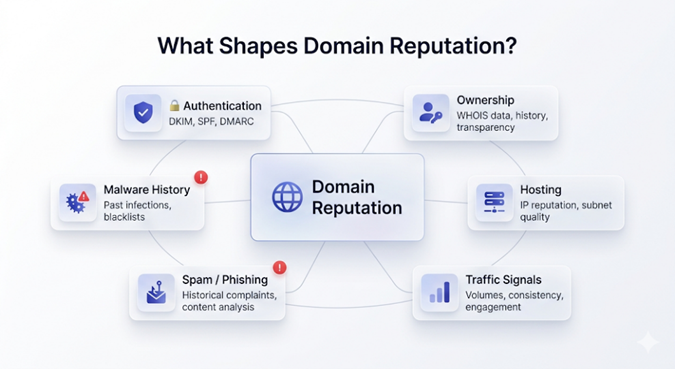
A clean MXToolbox result only shows what’s visible today. Many reputation issues stay hidden while domains are parked, then surface the moment you put them to use.
This guide shows you how to evaluate domains thoroughly before those hidden risks become expensive problems.
Why a Clean Blocklist Snapshot Can Be Misleading
Domain reputation systems do not all evaluate trust the same way. Public blocklists show current status, but email providers, browser security systems, and enterprise networks may also weigh historical behaviour.
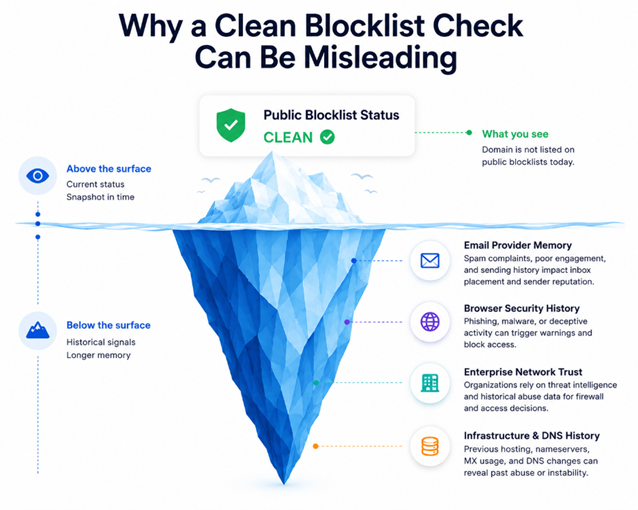
That means a domain previously used for spam, phishing, or abusive campaigns can appear clean in a surface-level lookup while still creating operational problems later.
Dormant domains can be especially deceptive because public listings may expire while residual trust issues persist elsewhere.
The three layers that actually matter:
Trust Layer | Main Sources | What It Affects |
Email Trust | Spamhaus DBL, SURBL, Barracuda | Inbox placement and sender reputation |
Browser Trust | Google Safe Browsing, PhishTank | Security warnings and user trust |
Infrastructure Trust | Cisco Talos, Trellix TrustedSource, Sucuri | Corporate firewall blocks |
If you’re keeping tabs on 3-5 domains, you can track it all by yourself.
Why Manual Checks Break Down at Portfolio Scale
When you’re buying a portfolio of 50, 200, or 500 domains, it falls apart fast.
Due diligence now competes with escrow timelines, registrar transfers, expiry deadlines, valuation calls, and tough negotiations. Manual checks don’t scale - and sellers almost never give you the full operational history.
Secondary domains, typo variants, old redirect chains, prior campaign infrastructure, compromised subdomains, none of that shows up neatly in the listing.
Now add hundreds of domains, half a dozen disconnected tools, and inconsistent signals.
The obvious issues get caught. But the ones that hurt are the ones you never thought to check.
So, what’s
Domain Blocklist Check: The 5-Pillar Framework You Can Use
This 5-pillar framework works great for vetting single domains and serves as the foundation for evaluating multiple domains as well.
However, if you’re working with portfolios at scale, you’ll need automation and ongoing monitoring to make this process sustainable - that part is covered in another section at the end.
Feel free to jump there if you want to go straight to the scaling piece.
Pillar 1: Discovery
Start broad. Don't just evaluate the listed domains. Use Bishopi's Domain Name API to scan a keyword across 1,000+ TLDs in a single request against a database of over 3 million records.
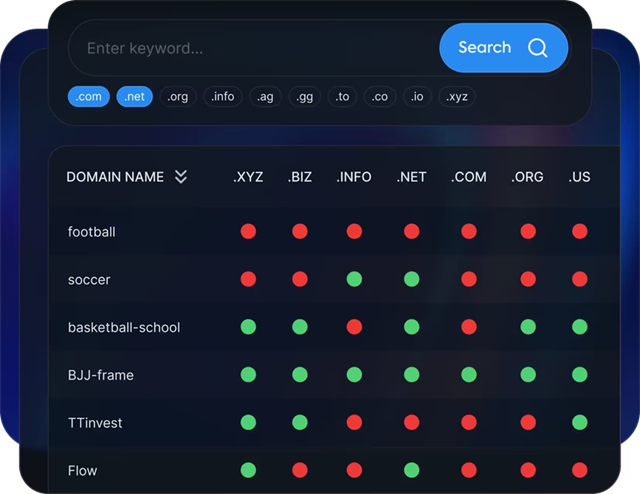
Sellers frequently fail to disclose misspellings, defensive registrations, and lookalikes - this step finds them. Many carry reputation baggage that would transfer to you as the new owner.
Skipping discovery means you're doing due diligence on the domains the seller chose to show you, not the ones that matter.
Pillar 2: Trust-Source Evaluation
Once you know what needs to be checked, evaluate the trust sources that affect real-world usability.
No single tool tells the full story.
A domain can look clean in Spamhaus but still get blocked by Google. Another might pass browser checks but get rejected by corporate firewalls. Different systems care about different sins.
Here’s what actually matters:
Spamhaus DBL & SURBL - For email deliverability and inbox placement
Google Safe Browsing & PhishTank - For Phishing, malware, and browser warnings
Cisco Talos, Trellix TrustedSource, Sucuri - To know whether enterprises will trust the domain
Your intended use changes everything. A domain for outbound email carries a very different risk than one you’re just parking or flipping. Clean results across all sources are good. Inconsistent signals are a loud warning to slow down.
Pillar 3: Historical Enrichment
Even a clean domain can carry operational baggage that only becomes obvious once you review its history.
Using Bishopi’s Domain Analysis API, check:
Registrar and ownership changes: Repeated flips often signal speculative churn, flipper activity, or prior abuse.
Nameserver and DNS history: Infrastructure volatility is frequently a bigger red flag than any current blocklist status.
MX history: This shows if the domain was used for real email campaigns, bulk sending, or short-lived spam runs.
Subdomain creation patterns: Sudden spikes in random or disposable subdomains are a classic abuse signature.
Aged domains especially need this level of scrutiny. Strong backlinks and a clean present can be misleading. What actually determines whether the domain is usable is how it was used in the past.
Skip this domain history check and you’re buying on hope. Do it properly and you’ll see problems most other buyers will completely miss.
Pillar 4: Historical Verification
Public blocklist tools show current status. That is useful, but it is not the full picture. If the domain has email history, the next step is verifying what the underlying platforms saw.
Two sources are especially useful:
DMARC RUA aggregate reports: These show sending infrastructure observed during the reporting window by participating mailbox providers. For serious acquisitions, asking the seller for up to 12 months of reports can help surface historical email activity that a public blocklist check will not show. Gaps in coverage are worth asking about.
Google Postmaster Tools (Sender Reputation + Spam Rate): Ask for exported screenshots covering the past 90 days. If Gmail reputation has been degraded, this is one of the few direct visibility points available to senders.
These reports regularly surface problems that no public tool flags. If a seller can't or won't provide them, treat that as a data point.
Pillar 5: Risk & Remediation Cost
Not every flagged domain is a bad acquisition. Some are simply more expensive to make usable.
Before negotiating, estimate:
cleanup time
authentication setup (SPF, DKIM, DMARC)
delisting effort
deployment delays
lost revenue while issues are being resolved
Bishopi's Domain Value Analysis tool provides historical sales comps, monthly trends, and baseline valuations.
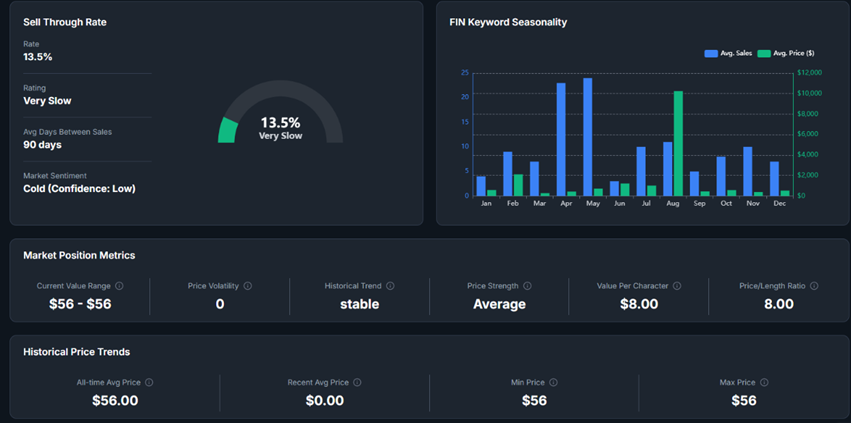
Subtract the estimated remediation cost before you name a number.
The discount you can justify depends on severity and how long cleanup realistically takes - document both or you're negotiating blind.
How to Use This in a Negotiation
Most sellers have no clue you can pull this level of data. That’s your real edge.
Walk into the negotiation with MX record history, nameserver timestamps, and Google Postmaster Tools screenshots in hand. The moment you drop that, “clean domain” stops being a credible claim. Now they have to defend it - and you already have the receipts.
When you can show past spam flags or multiple ownership transfers, pricing discussions become about risk, not just seller claims.
Sellers usually react in one of two ways: they either get serious and negotiate properly, or they fold and walk. Honestly? Both are better than closing the deal and dealing with the mess six weeks later.
→ Here’s the practical part: Your discount should match the cleanup cost.
Fixing a Spamhaus listing with good history might take a few days. Rebuilding Gmail sender reputation after real abuse? That can drag on for months. Price that pain into your offer - or walk away.
How to Monitor Domain Reputation at Portfolio Scale
When you're managing domain reputation at scale, the problem is not monitoring. The problem is what happens after a signal appears.
If monitoring lives in one tool, historical analysis in another, and valuation somewhere else, your team ends up stitching together decisions manually. That does not scale.
The solution is to connect monitoring, context, and decision-making in a connected system.
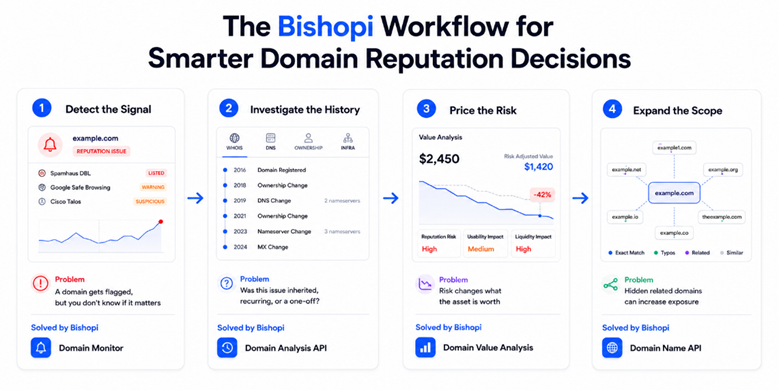
Start with the signal, then add history: Domain Monitor shows reputation changes across your portfolio.
The Domain Analysis API adds the surrounding context, including WHOIS history, DNS changes, registration timelines, and related infrastructure, so you can quickly tell whether a flag is incidental or changes how you think about the asset.
Use that context to make acquisition calls: Reputation issues are not just technical signals. They affect whether a domain is usable, what risk you are inheriting, and what the asset is actually worth.
Domain Value Analysis helps quantify that impact, while the Domain Name API helps surface typo variants, related domains, and exposure you may have missed.
When monitoring, history, and valuation work together in one workflow, you make sharper decisions on both new acquisitions and the domains you already own.
Get an Edge With Thorough Domain Research
Domain reputation problems are far easier to avoid than to unwind.
Buyers who do proper due diligence negotiate from a position of strength. They uncover hidden risks, justify bigger discounts, and avoid costly surprises after the deal closes.
Those who don’t end up paying for remediation, lost time, deployment delays, and damaged reputation — often months after the money has left their account.
Stop buying blind.
FAQs
1. What is the difference between an IP blocklist and a domain blocklist?
IP blocklists go after the server or hosting IP. Domain blocklists stick to the actual domain name. You can switch hosting providers and fix an IP problem pretty quickly, but a bad domain reputation travels with the domain. That’s what makes it so dangerous.
2. Why do standard checks miss problems on expired or parked domains?
Most free tools only look at the present. Once a domain is parked or expires, the public blocklists often drop it after some time. But Gmail, browsers, and enterprise security systems have longer memories. A domain can look spotless today and still cause headaches once you start sending emails or driving traffic.
3. How much does bad reputation affect resale value?
It hurts more than most sellers want to admit. A single serious flag is enough for many experienced buyers to simply move on. The pool of interested buyers shrinks fast, and the ones who remain usually offer much less - if they offer at all.
4. How long should you monitor a newly acquired domain?
I recommend watching it closely for at least 30–60 days after you start using it. A lot of issues stay quiet while the domain is dormant. They tend to show up only when you actually send email or get real visitors. The first couple of months is when surprises usually hit.
Originally published at: bishopi.io
Stay up to date
Get updated with all the news, update and upcoming features.